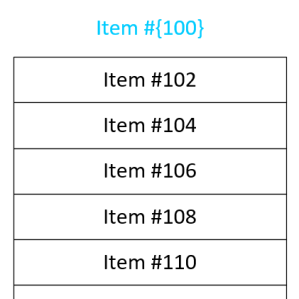
 I frequently have the need to get text into separate boxes in Visio. And often I need those boxes to have some sort of incremented series, such as 1, 2, 3, or A, B, C. I’ve built some SmartShapes to help ease my pain, and I’m sharing them with you today!
ShapeSheet
Visio Nerd Videos – For Developers!
If you’re interested in the deeper workings of Visio, then you’ll be interested in a series of videos that I’ve been in remiss in reporting!
ShapeSheet through the Ages
 This week on the Visio History Channel…
If you enjoyed yesterday’s walk down memory lane, and you lean toward the technical/programmer side, then you might enjoy this fluff piece–a look at the evolution of the ShapeSheet.
Get Web Hex Color Values from Visio Shapes
 Web designers and AI folks need to know what colors they are using. And they need to know precisely.
Bright red, Fuchsia and Mauve just won’t do. They need exacting names like: #FF0000, #FF00FF and #E0B0FF.
Since more and more folks are using Visio for prototyping web sites and user interfaces, I thought it might be useful to create a SmartShape that displays the hexadecimal color value for a particular shape.
[Read more…] about Get Web Hex Color Values from Visio Shapes
List Separators in Visio’s ShapeSheet are Crazy!
 Are you developing Visio solutions that will be used across the Globe? Have you experienced strange behavior using ShapeSheet functions like INDEX, LOOKUP, SUM, RGB or others that involve lists of items?
If so, then you, my friend, are a victim of list-separator craziness!
[Read more…] about List Separators in Visio’s ShapeSheet are Crazy!
Text Along a Connector’s Path in Microsoft Visio 2010
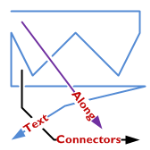
A feature lacking in Visio, like for-EVER, is the ability to align text along a connector’s path.
Now, Visio 2010’s new ShapeSheet functions and capabilities finally deliver.
Today we’ll show-off the cool new connector that I’ve developed for you, and get a very light technical explanation as to how it works!
[Read more…] about Text Along a Connector’s Path in Microsoft Visio 2010
Choose Colors with Shape Data Fields
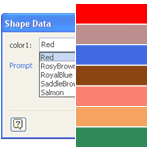
Do you have shapes that contain multiple colors that you’d like to easily change?
Wouldn’t it be neat to be able to specify those colors in Shape Data fields, along with other parameters for the shape?
Visio’s Shape Data fields don’t directly support colors, but I’ve come up with a workaround. You can read how I did it, or just get the download and re-use what I’ve already built!
Why Visio Shape Smarts Makes Your Life Easier
 It’s easy to use Visio and not notice some of the things that make it a great diagramming application.
One great feature is how shapes resize–or more aptly–how parts of shapes resize. If you’ve wondered about the term “SmartShapes”, this is an area where Visio shapes are truly smart.
So let’s take a visual tour and see how Visio SmartShapes do intelligent resizing that saves you time and improves your diagrams.
[Read more…] about Why Visio Shape Smarts Makes Your Life Easier
Flip the Switch, Feed the Creature
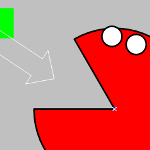 People really get excited about Visio when they see that SmartShapes can react visually to changing conditions.
Whether you change size or position, data stored with the shape, select a context menu item or double-click, a Visio shape can be built to show that something has changed.
A classic example of this is a simple rectangle that changes color when you extend it beyond a certain length…
A Re-programmable Visio Multi-shape: The Configurable Stickman!
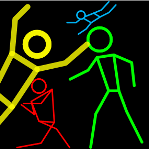
If you’ve read our last article, Visio Multi-shapes, then you know what a great feature multi-shape-ness can be.
However, until you graduate from Visio Geek University (go VGU!), and become proficient with ShapeSheets, those pesky multi-shapes can be quite difficult to build.
So what if user’s could somehow define their own multi-shapes?
That question has burned today’s article into my mind, and today it comes to you via the information super-highway. Ladies and Gentlemen, may I introduce to you the Configurable Stickman, which who can be set to one of five positions.
And YOU can define the positions yourself!
[Read more…] about A Re-programmable Visio Multi-shape: The Configurable Stickman!