• Categories

  • Archives

  • Subscribe

  • Meta

Archive for the 'Power User' Category


Battle Zone Theme Template

Posted by Visio Guy on 28th June 2008 - 585 views

Read Full Article

1980 witnessed the launch of the classic arcade game Battlezone by Atari.

In 2007, Microsoft launched Visio 2007, which included the new Themes feature.

For 28 years, the two have been on a collision course with destiny...linked by computers, the Geek Factor...and Fate.

Read the rest of this entry »

Posted in Drawings & Templates, Power User | 2 Comments »

Importing Images as Backgrounds for Scaled Drawings

Posted by Visio Guy on 21st May 2008 - 831 views

Read Full Article

You've already got your plan...but it's only available in paper format. Not to worry, you scan it and use it in your scaled Visio drawing anyway!

Recently, we talked about techniques for using images as backgrounds for tracing vector-based Visio shapes in the article: Importing Images as Backgrounds for Tracing. What that article didn't cover were issues related to scaling.

In today's article, you'll learn how to quickly import an image of a measured drawing and configure it for used in a scaled environment!

Read the rest of this entry »

Posted in Power User | 2 Comments »

Understanding Arc-Resize Problems in Visio

Posted by Visio Guy on 28th April 2008 - 871 views

Read Full ArticleIf you've ever drawn arcs in Visio, then grouped them together with other shapes, you may have noticed that they behave rather oddly on resizing. As you make the group bigger or smaller, the arcs may bow or squish in ways that you didn't expect.

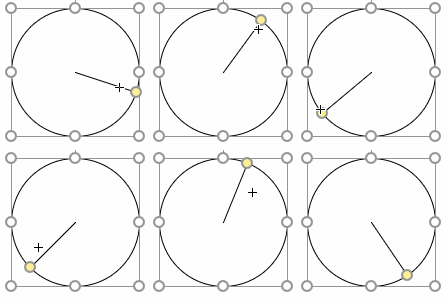
This problem arises because of the interaction style of the arc shapes, which is 1D. Visio has two interaction styles: 1D and 2D. They have to do with the green handles you see on the shape, and how you go about manipulating the shape with the mouse.

In this article, we'll describe the difference between the two interaction styles, and explain how to correct resizing problems you might be encountering.

Read the rest of this entry »

Posted in Code, Power User, ShapeSheet | 2 Comments »

Sewing Patterns With Visio

Posted by Visio Guy on 28th April 2008 - 951 views

Read Full ArticleRelatives ask me now and again if That Visio software can help me make quilting patterns?. I start to answer Well, maybe... and then we get side-tracked by family gossip and questions about When ya moving home?, etc, so nothing ever comes of it.

Between my relative's inquiries and the decent traffic for the article: Visio for Fashion Design?, this seems to be a niche with more than passing interest.

On a recent trip to the Great Northwest and the Land of Microsoft, the sewing question arose yet again, but this time I had a large swath of fabric at my disposal.

The wheels in my head started turning...

Read the rest of this entry »

Posted in Humor, Power User | 1 Comment »

Importing Images as Backgrounds for Tracing

Posted by Visio Guy on 16th April 2008 - 1656 views

Many Visio users create detailed elevation drawings of network and audio/visual equipment. The quality of these drawings can impress customers and enable equipment to be more quickly recognized in a diagram.

While vendors such as Altima and D-Tools provide detailed Visio shapes, you may find yourself needing to create your own shapes from time to time.

One method for creating detailed equipment shapes involves tracing an image of the actual gizmo. We'd like to offer a few tips to help you get the job done in Visio!

Read the rest of this entry »

Posted in Development, Power User | 4 Comments »

Center-sizing Smart Shapes

Posted by Visio Guy on 15th April 2008 - 1289 views

Read Full ArticleVisio has tons of keyboard shortcuts, including modifiers for constraining the resizing and moving of shapes. For instance, with the Shift key depressed, you can constrain a shape to move only vertically or horizontally. Neat-o!

But unless I have totally missed something (which does occur occasionally), there is one feature that Visio could really use: the ability to resize shapes on-center.

Read the rest of this entry »

Posted in Illustration, Power User, ShapeSheet, Shapes | 4 Comments »

How Big Is My Shape?

Posted by Visio Guy on 13th April 2008 - 1075 views

Read Full ArticleWhether you're a Visio end-user creating measured drawings, or you're developing a Visio solution with customized Visio shapes, at some point, you'll want to know how big your shapes are, and how to precisely resize them.

There are several ways to do this, and many of them allow you to edit the data as well. Today's post offers a run-down of the many ways that you can edit and view the size of your Visio shapes!

Read the rest of this entry »

Posted in Development, Power User, ShapeSheet | 2 Comments »

Effects of Imported Images on Visio File Size

Posted by Visio Guy on 12th April 2008 - 1324 views

Read Full ArticleYou can quickly create detailed shapes by importing images into Visio. If you don't have time (or budget!) to make a detailed drawing of that special ThinkPad or iPhone or USB Stick shape that you've been craving, you can simply browse for an image, and insert it into Visio!

It's a fairly simple matter that you can achieve via two ways: Choose the menu: Insert > Picture > From File... or: Copy an image from an image-editor or image-viewing program and paste it into a Visio page. Simple indeed!

But what happens to Visio file sizes when you import images?

Does Visio compress famously-large BMP files on import, or will the .vsd become huge itself? Will we get significant savings by importing JPG or PNG files as opposed to straight-bitmaps?

Well today, we ran a few tests to see what happens!

Read the rest of this entry »

Posted in Development, Power User | 6 Comments »

Work Faster With Our Top Visio Keyboard Shortcuts

Posted by Visio Guy on 9th April 2008 - 2042 views

Read Full ArticleAn old Visio Corporation coworker of mine used to talk about "...being a two-handed Visio user, as opposed to being a one-handed Visio user."

What he meant was that you can get a lot more done if you learn a few keyboard shortcuts and mouse techniques.

The Visio keyboard shortcuts that we're sharing with you today will allow you push, pull and prod Visio in a fashion that seems almost natural. By learning them, the drudgery of tasks that you need to perform often will become reactionary, and almost invisible!

Read the rest of this entry »

Posted in Power User | 17 Comments »

How to Draw Glass in Visio

Posted by Visio Guy on 18th March 2008 - 2940 views

Read Full Article

Today we’re going create a glass effect, using basic end-user features of Visio.

With a few simple techniques, you’ll be able to add pizzazz to your elevation drawings of windows, cabinetry, video monitors, rack-systems.

Now, maybe you’re thinking; Visio is not Adobe Illustrator, and Visio diagrams are supposed to be simple, boring, and utilitarian. A quick glance at this site might bring you to question that notion.

But don’t just take our word for it…

Update: You can now download a Visio drawing with samples shapes at the end of this article

Read the rest of this entry »

Posted in Development, Illustration, Power User, Shapes | 9 Comments »

How Many Fill Colors Can You Put on a Visio Shape?

Posted by Visio Guy on 4th March 2008 - 1394 views

Read Full ArticleThe easy answer to this questions is: two. A single-shape can have two colors in its fill: a Fill Color and a Pattern Color.

If you want more, you have to group separate, differently-colored shapes together. In fact getting more colors is one of the major reasons that shapes become groups in the first place.

But if two were the actual answer, well, this article would over.

You see, Visio-Guy-friend Saveen Reddy has been up to his usual tricks of pushing Visio beyond the obvious and into the intriguing...

Read the rest of this entry »

Posted in Development, Illustration, Power User, ShapeSheet | 9 Comments »

Resize Text With Metafiles!

Posted by Visio Guy on 24th August 2007 - 2394 views

Read Full ArticleA common question from budding Visio SmartShape developers is: "How do I get my text to resize with the shape?" Well, there are a few typical responses to that question, but this article focuses on a very simple method that you can use for text that does not change. So if you're building shapes with company logos, digital readouts, or something similar, then read on!

Read the rest of this entry »

Posted in Power User, ShapeSheet | 1 Comment »

  • Tag Cloud

  • Recent Comments on Visio Guy

  • RSS The Latest from the Visio Guy Forum

  •