
If you’ve ever been frustrated by trying to open a Visio attachment while browsing e-mails from your iPad on the couch, then you might be interested in this Visio viewer…for the iPad!
Smart graphics for visual people
If you’ve ever been frustrated by trying to open a Visio attachment while browsing e-mails from your iPad on the couch, then you might be interested in this Visio viewer…for the iPad!
 Fall has arrived and Oktoberfest has started here in Munich!
The world’s biggest beer festival started 200 years ago, so to commemorate the bicentennial, and involve you in the revel, we’ve created a Visio Beer Maßkrug SmartShape just for you!
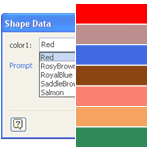
Do you have shapes that contain multiple colors that you’d like to easily change?
Wouldn’t it be neat to be able to specify those colors in Shape Data fields, along with other parameters for the shape?
Visio’s Shape Data fields don’t directly support colors, but I’ve come up with a workaround. You can read how I did it, or just get the download and re-use what I’ve already built!
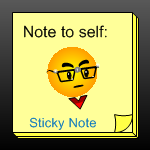
If you like the way you can add comments to Microsoft Excel worksheet cells, or the way you can glue Post-it sticky notes to your monitor’s bezel, then you’ll appreciate this sticky note Visio SmartShape from guest-poster David Edson!
Today’s offering has some pretty neat features, so check out the article which explains how to use the shape, and shows off its unique capabilities!
[Read more…] about Take Note With the Visio Sticky Note Shape
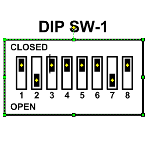
Recently in the Visio Guy Newsgroups, user Ziorg77 submitted a wonderful Visio SmartShape of a DIP switch, where you could toggle each of the eight switches individually.
This led to a flurry of discussion, and several more user-submitted versions of the shape.
Each version had a unique interaction style that provided an opportunity for a fascinating comparison of Visio shape behavior and user interaction.
You can see all the shapes in action in a video I’ve prepared, and–even better–you can download these free Visio shapes at the end of this article.
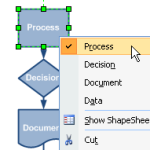 A great feature of Visio SmartShapes is multi-shape capability.
With multi-shapes, you can quickly modify how Visio shapes look via the context menu or shape data fields.
This represents not only a time-savings to users creating drawings and diagrams, but also simplifies the design and maintenance of stencil libraries for solution developers.
So yes, multi-shapes are cool, and they are a big part of what makes Visio cool.
If you haven’t yet run into them, read on to get a better idea of what multi-shapes can do for you!
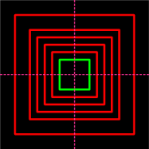 Visio has tons of keyboard shortcuts, including modifiers for constraining the resizing and moving of shapes. For instance, with the Shift key depressed, you can constrain a shape to move only vertically or horizontally. Neat-o!
But unless I have totally missed something (which does occur occasionally), there is one feature that Visio could really use: the ability to resize shapes on-center.
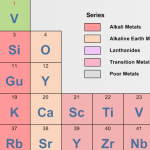 David Edson of long-time Visio fame, and currently of Visibility.biz, recently sent us a high-quality Visio rendition of the Periodic Table to share with you.
You’ll want to note that this download is more than just a static diagram! You can use it as an interactive reference, because each SmartShape contains extra information about each chemical element. And you can even right-click each element to link to the Wikipedia entry about each substance!
[Read more…] about Do You Know Your Elements? A Visio Periodic Table
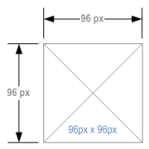
I found some blog posts about pixel rulers for Visio. It seems that folks wanted to dimension their Visio shapes in pixels, which Visio doesn’t technically support by default.
But for folks who use Visio to do web-layout wireframes, information architecture and storyboarding, pixel-dimensioning is a useful thing to be able to do!
An earlier article on Visio Guy served up the Rack Unit Dimension Line, which can actually be configured to measure shapes in terms of pixels. But to save time, I’ve modified that shape and offered it here, for your pixel-dimensioning enjoyment.
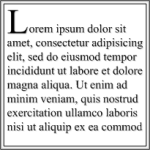
Evidently, lots of designers are using Visio to layout pages. As you dig around on the web, you’ll bump into terms such as IA, Information Architecture, Storyboarding, and Wireframes. These all have to do with designing the look and feel of web pages or other documents.
If you’re doing any sort of page-layout design, you might be interested in quickly creating paragraphs and sections of dummy text that you can format according to the page’s style characteristics. So I thought it would be neat to design a Visio SmartShape that automatically repeats a chunk of text over and over, to speed up the process of laying out a page.
[Read more…] about Lorem Ipsum – Visio IA Text Placeholder Shape