Attention process engineers!
Calling all techies who work in:
– Oil refineries
– Water treatment facilities
– Any plant that produces a product in liquid form!
For years one of Japan’s top Visio experts, Junichi Yoda, has offered his 3D Isometric Piping shapes to download for free. I’ve long loved these shapes (having studied mechanical engineering myself), and have put off far showcasing them on Visio Guy for far, far too long!
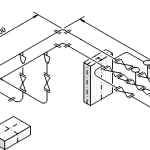
Sample Piping System Included
Yoda includes a sample drawing that you can download and play with, to get a feel for how the shapes should be used:

Shapes for Every Perspective
The stencil contains 74 action-packed shapes. Here’s a look at what you get:
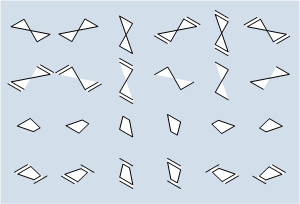
Valves, Reducers and Expanders
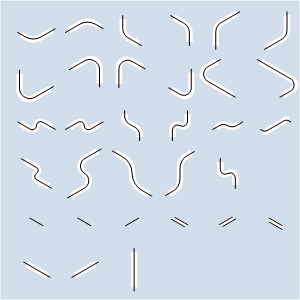
S and L Joints
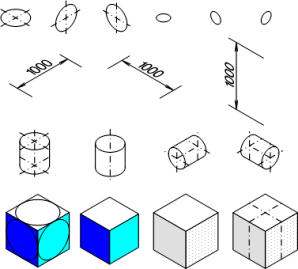
Other Isometric Goodies
You can download these wonderful shapes here:
Edit: 2021.06.25 Junichi’s website is no longer active. We haven’t heard from him on the forum for several years and assume he’s retired from Visio. He is dearly missed. The links here and below have been removed. I’ve zipped everything I could find and placed it for download at the end of the article.
Edit: 2009.11.11 link updated to Japanese mirror site, as the old Geocities link was broken or gone.
Cool Extras
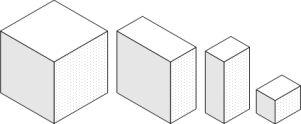
In addition to the piping shapes, he’s included some nifty isometric cube shapes. The samples below were all made from one master, simply by dragging on the control handles.
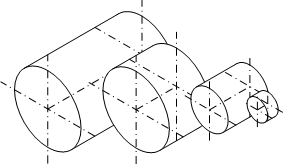
Similarly, the isometric cylinder shape can take numerous forms:
He’s also included dimension lines so that you can add scale and measurements to your isometric piping diagrams:
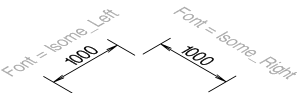
Junichi’s web site includes isometric fonts that you can download for free, along with complete instructions on how to get them to work with the piping shapes:
- How to Install Isometric Fonts
- How to Set Up Isometric Fonts for Isometric Dimensions
- How to Use Dimensions
Edit: 2021.06.25 these links were removed, as explained previously.
Edit: 2009.11.11 link updated to Japanese mirror site, as the old Geocities links were broken or gone.
Ease of Use
By gluing joint-shapes to valves, you can easily reposition the shapes, without worrying about re-drawing the piping.
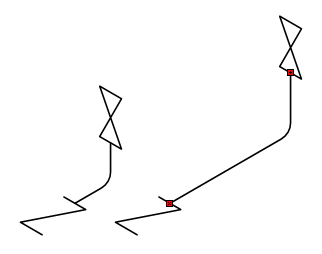
The red handles in the illustration above indicate that the elbow joint is glued at both ends to the valves. When the valves are moved, the joint follows along!
Let’s all give Junichi Yoda a big round of applause, and a heart-felt Thank You for creating this cool set of shapes!
Edit: 2009.01.13 – Stefan, one of our Visio Guy forum members, submitted some fantastic Visio sample drawings that use these isometric piping Visio shapes. Have a look at this newsgroup post.
Download “3D Isometric Piping Shapes”
s!Aj0wJuswNyXliBo-NJpa6URXriHp – Downloaded 44840 times –
This nice toolset appears not compatible with 2016 VISIO version anymore.
Is there an updated version somewhere?
Many thanks
Works fine with my Visio 2016.
had to change file block settings in trust center.
(unchecked box to use)
Hi,
I would like to shrink the size of the valves. How am I to do so? Please advice.
Regards,
Vik
Is it still possible to download these piping shapes?
Hi Barend,
The download button wasn’t working. I’ve fixed it now — it’s a redirect to the site that has the content.
Any chance to update download link? Thanks.
Hi Roman,
I found where they moved to, and have updated the download link!
Hello, would you please re-upload to another server? Because the link is dead.
Thanks for the head’s up. We haven’t heard from Junichi for several years. He was an older gentlemen, and some of us fear the worst. He is dearly missed from the Visio community.
It looks like his domains are no longer being maintained. I’ve added a new download button with a zip file of all the stuff I had on my PC. Hopefully this is enough to keep creating outstanding isometric piping diagrams.
Please some could help me I have an issue with openning the file it appears like the file has been block from the server How can i unblock this file??
regards
Hi, I’m having trouble finding the file to download. I recently swapped machines and lost the stencil package. I’m going to be heartbroken if I can’t get another stencil package because it was absolutely wonderful!
is there any chance you could send me the file for the piping isometrics for 2021 by email as i currently offshore and cant download anything on the computer out here but will be able to from my email. if you could help please
what folder should this file contents be placed in?