 If you have a need to create repeating graphical elements, then learning how to create custom line patterns in Visio is absolutely essential.
Visio custom line patterns offer a power and flexibility that will save time for both your end-users and your solution development effort. And your final product will have a refined and elegant look.
Recently, John Goldsmith of Visual Signals, UK posted two excellent articles about creating custom line patterns in Visio.
John’s articles focus on creating patterns with a random-effect, and are packed with valuable information. Not only do they take you through the process of creating custom line patterns, but they offer creative tips, and deep insight into the inner mysteries of Visio custom line patterns.
Here are the articles on John Goldsmith’s visLog:
The articles articles inspired me to create some wacky patterns. Here’s the Dualing Browsers pattern:

And the Emotionally Unstable Barbed Wire pattern:
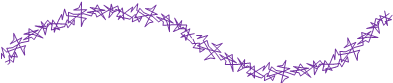
You can get these two odd-ball characters here:
Download “Silly Custom Line Patterns for Visio”
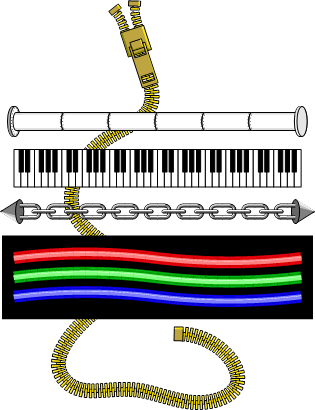
s!Aj0wJuswNyXlhhiJtLp9NvFFWBlF – Downloaded 6911 times – 103.00 BIn addition to all the great tips and insight, John has posted some resources that I dug out of my archives. Here’s a quick preview of some of the Visio custom line patterns that you can download from his articles:
If you need step-by-step information about creating custom line patterns from scratch, you might also want to head over to the on-line version of Developing Visio Solutions, which lives on MSDN.
This link will get you going: Chapter 10: Custom Patterns from Developing Visio Solutions.

What about a custom line pattern that is two-colored? Like solid yellow but with black dashes? I tried to create some but it didn’t look very good, was kinda hard to distinguish the colors from each other. It’s like it needed some special effects like a blending technique.
It’s just a matter of getting the pattern unit right.
I’ve used two-color patterns a lot, but you wouldn’t think of them as two-colored: I create a solid line with a slightly-larger white background. This makes overlapping lines really easy to see, but non-cluttering!
Aaron, the problem is that black in a custom line or file pattern is special. It takes on the line colour or fill colour assigned. To get around the problem, you have to use one of the almost black colours. 255,255,254 or 255,254,255 or 254,255,255
Guys, those RGBs are almost-white. Gotta go to the other end:
Almost-black would be RGB(1,1,1) or RGB(1,0,0), RGB(0,1,0), or RGB(0,0,1).
Chris,
I’m trying to understand the exact behaviour of the custom line patterns, and how to obtain the pattern I want.
At the moment, I want to create a simple square-wave pattern to be used in box joint / finger joint design.
Since it’s being used as a pattern for a physical joint, the pieces must fit together, and so compression distorts the “fingers”. Is there a way to obtain the cropping behaviour of the stock VISIO line patterns? I’m playing around with trying to get the square wave to be on one side of the line or the other – not centered on the line. I’ve noticed that this can cause the pattern to flip from one side to the other as I resize the line. Also, I’d like to include an extra “finger” or “slot” on one side of the line or the other, and VISIO’s treatment of custom line patterns with custom line ends really screws up the pattern.
The pictures in the dialog boxes are horrible – what ever happened to WORDS? The “online help” is essentially no help at all.
At the moment, I’m using VISIO 2007.
I can email you a copy of a VSD file to show what I’m doing if that helps.