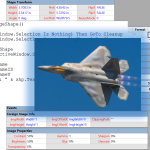
If you’re interested in the deeper workings of Visio, then you’ll be interested in a series of videos that I’ve been in remiss in reporting!
Smart graphics for visual people
If you’re interested in the deeper workings of Visio, then you’ll be interested in a series of videos that I’ve been in remiss in reporting!
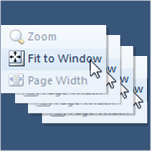 If you create Visio documents with lots of pages, you probably like to quickly flip through all of them to check for visual consistency.
But if each page has been zoomed or panned, it can be frustrating to have to click Fit to Window for each page.
But with a little macro code, you can make your life a lot easier!
[Read more…] about Fit All Pages to Window in a Visio Document
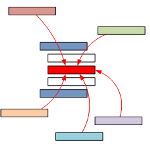 VBA in Visio is great for learning, prototyping and getting repetitive tasks done quickly. One problem I run into–when I’m not careful—is bloated code resulting from the copying and pasting of too many loops. But with the CallByName function in VBA, we can streamline our code! [Read more…] about Save Time & Simplify Your VBA Code With CallByName
UPDATE!
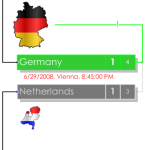
Hey football/soccer fans! We’ve got an update to our automated smart drawing for this years European Cup soccer tournament.
Perhaps you are familiar with the first version, which can be found here: European Cup 2008 Auto-Updating Diagram
Well, that version needed a few updates, most notably, the handling of games that are resolved with penalty-kicks, or shoot-outs.
[Read more…] about European Cup 2008 Auto-Updating Visio Diagram (v2)
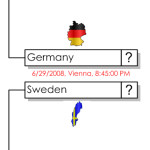
Visio is a natural choice for creating brackets for sports tournaments.
I have seen many elimination-tournament diagrams created in Visio over the years. In fact, just a few years ago, a very nice example was done for the 2006 World Cup. You can get it at Office Online here: 2006 World Cup Bracket.
But the trouble with these diagrams is that they require *gasp* manual input of data, or user-movement of shapes. The horror!
Well this year, that is all going to change…
[Read more…] about European Cup 2008 Auto-Updating Visio Diagram
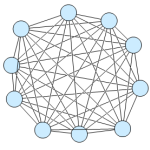 If you’re a developer, looking to create Visio-based solutions, then you’re going to need to programmatically connect Visio shapes together. Wouldn’t be nice to have a snippet or two to start from?
Today’s post shows you VB and C# code that instructs Visio to connect every shape to every other shape, and to create a beautiful mess, like that shown in the image at left.
 Whether or not you attended my session about the deep, dark secrets of Visio development today at the Microsoft Office Visio Conference 2008, you might be interested in the session materials.
[Read more…] about Visio Solution Developer Pain Points Presentation
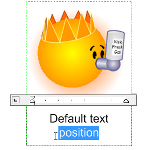 A Visio newsgrouper recently pointed out that in Visio, inserted images have a different default text position than normal shapes. For images, the text is located at the bottom of the shape, and text “grows” downward.
This makes sense, since you usually don’t want the text to obscure the image. But perhaps you shape developers out there in Internet Land might wish to have the same text behavior for your shapes!
In this article, we’ll discuss how to do it by hand, and offer some VBA script to get the job done faster!

Visio 2003 has a defect in the LengthIU property of a Shape object. This article discusses the bug, describes a work-around, and offers Visual Basic code to help you get back on track!
 OK, we’ve just about had enough! Between all the newsgroup posts, and John Marshall’s nagging, it’s time to do something about adding text to a circle in Visio. ‘Til now, the standard response has been; “insert a Word Art object”. But with Visio’s SmartShape- and automation capabilities that just won’t do! We ought to be able to build something cool–and more native to Visio. This article presents the first in a series of the Circular Text Generator! [Read more…] about Circular Text Generator (version 1)