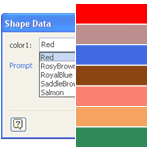
Do you have shapes that contain multiple colors that you’d like to easily change?
Wouldn’t it be neat to be able to specify those colors in Shape Data fields, along with other parameters for the shape?
Visio’s Shape Data fields don’t directly support colors, but I’ve come up with a workaround. You can read how I did it, or just get the download and re-use what I’ve already built!
If Only I Could Pick Colors in Shape Data Fields!
I wanted to allow users to pick colors for various parts of shapes at the same time that they specify other values: namely when they are editing Shape Data fields.
Previously, I had bastardized the foreground and background colors, and even shadow colors to allow users to benefit from built-in color picking interfaces. See Sankey Diagram Shapes for Visio, and Automatic Chevron Process Shape for examples of this. It works, but it isn’t immediately obvious to the user.
Other times, you have to expect user to sub-select sub-shapes, then format them individually. This can be annoying, because they might not know how to sub-select. Also, if your shape has data fields anyway, why not set all variables in one place?
Color-picking in the Shape Data window seems a natural thing to do. After all, Visio allows you to define fancy data types like dates:
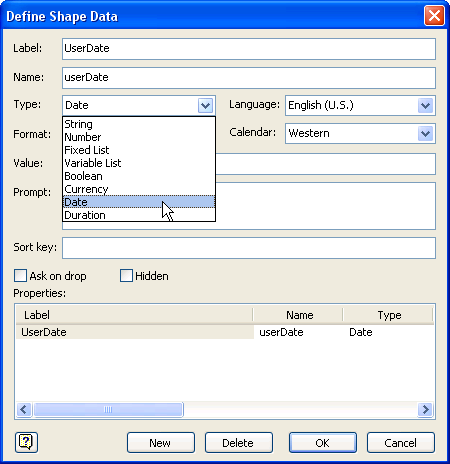
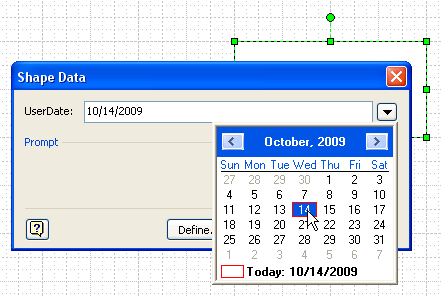
This gives you a nice, rich “picker” control like this calendar:
 So why not allow color to be one of the available Shape Data types?
Heck, even ConceptDraw allows you to define color as a Custom Property data type:

Sure, this drop-down isn’t as elegant as a color picker might be, but this gets the job done! (And Yes, I’m trying to provoke the Visio team in Redmond, if you haven’t noticed.)
Workaround: Choose Colors by Name
Since Visio is so customizable, you find yourself pushing it all the time. And when you push enough, you end up against a wall, such as this one, with “no color picker shape data type” spray painted all over it. But that same customizability allows you to come up with workarounds, time and time again.
This time, the next best thing was to create a drop-down list of named colors.
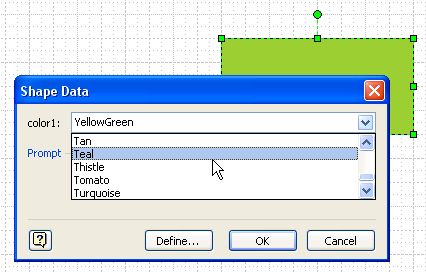
While visual pickers are nice, text drop-downs offer the consolation that you can quickly navigate them by typing the first letter of the color you are searching for. And today’s example has 140 different colors, so that quick navigation is nice to have.
So now you just need to learn and memorize what colors like: “Dark Goldenrod”, “Lavender Blush” and “Powder Blue” actually mean!
Building Color Lists in the ShapeSheet
To make this work, we need two lists: Names and RGB formulas. In the ShapeSheet, you can specify a color with a formula like this:
FillForegnd= RGB(139, 69, 19)
Which yields a reddish-brown color.
We can then make a list of RGB formulas, and a corresponding list of names for those colors. The LOOKUP and INDEX ShapeSheet functions can then be used to transform a name into a color-formula.
Inside of the shapes I built, the ShapeSheet has some user cells:
User.colorNames = “AliceBlue;AntiqueWhite;Aqua;…”
User.colorValues = “RGB(240,248,255);RGB(250,235,215);RGB(0,255,255);…”
User.color1 = INDEX( LOOKUP( Prop.color1, User.colorNames ), User.colorValues )
The first two cells are self-explanatory. User.colors, however, is a bit more complicated.
You’ll notice that it references a Shape Data field called Prop.color1.This contains the value that is selected by the user in the Shape Data window. Once we have a name, we find it’s position in the name list using LOOKUP. Then we grab the RGB formula from the other list using that position as an argument to INDEX.
Prop.color1’s important cells look like this:
Prop.Color.Type = 1 …fixed list
Prop.Color.Format = User.colorNames
Prop.Color.Value = INDEX( 139, Prop.color1.Format )
Note that Prop.Color.Format could just have easily contained the full list of names. But I put it in User.colorNames, so that it would be available for multiple fields. More on that later.
How to Get a Big List of Colors
I actually came to the idea of using color lists while working on another project, in which I was coding in C#. When you use the .NET framework, you can choose colors from built-in set, defined in the System.Drawing namespace.
I wrote a small procedure to extract all of those built-in colors, and build two lists at the same time: one for the color names, and one for the RGB ShapeSheet formulas. Programmers might be interested in this snippet, non-coders can skip right over it:
private void _dumpBuiltInColorInfo()
{
 // Collection to store the names of the colors,
 // and the RGB values:
 List colorNames = new List();
 List colorValues = new List();

 // Use reflection to analyze the System.Drawing.Color
 PropertyInfo[] piItems = typeof(System.Drawing.Color).GetProperties();

 // Loop through the items in the properties collection:
 foreach (PropertyInfo pItem in piItems)
 {
 Type t = pItem.PropertyType;

 if (t == typeof(System.Drawing.Color))
 {
 // Get the color object:
 Color c = (Color)pItem.GetValue(null, null);

 // Add the name to the names:
 colorNames.Add(c.Name);

 // Add a Visio-compatible color formula to the values:
 string rgbFormula = "RGB(" + c.R + "," + c.G + "," + c.B + ")";
 colorValues.Add(rgbFormula);
 }
 }

 // Dump a semi-colon-separated list of color names:
 Console.WriteLine(string.Join(";", colorNames.ToArray()));

 // Dump a semi-colon-separated list of RGB formulas:
 Console.WriteLine(string.Join(";", colorValues.ToArray()));

 // Copy the Output for use in a Visio shape's ShapeSheet!
}
Specifying Lots of Colors Using Shape Data Fields
To test it out, I built a shape that allows you to pick four different colors via Shape Data fields. It looks like this:
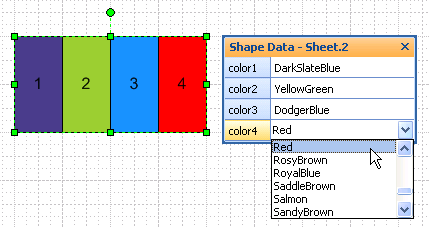
This shape has the cells User.colorNames and User.colorValues that we discussed before. But in order to simplify things a bit, I added another cell that defines a custom ShapeSheet function:
User.colorFunction = INDEX( LOOKUP( ARG(“chosenColorName”), User.colorNames), User.colorValues )
This allows me to define the logic for looking-up and indexing color names and color values in one central place. I can then re-use it multiple times without proliferating copies of that logic. If you’ve read User-defined ShapeSheet Functions in Visio 2007, then you’ll understand. If not, go have a look!
To get four different color values, I invoke the custom function like this:
User.color1 = EVALCELL( User.colorFunction, “chosenColorName”, Prop.color1 )
User.color2 = EVALCELL( User.colorFunction, “chosenColorName”, Prop.color2 )
User.color3 = EVALCELL( User.colorFunction, “chosenColorName”, Prop.color3 )
User.color4 = EVALCELL( User.colorFunction, “chosenColorName”, Prop.color4 )
There are four corresponding Shape Data cells that expose the data to the user: Prop.color1, Prop.color2, Prop.color3 and Prop.color4. You can see that by using EVALCELL to call the custom function, I only have to change one argument.
If I ever modify my color-lookup-logic, I will only have to change one formula: User.colorFunction. Pretty neat, and only available in Visio 2007 or later, by the way.
Accessing the Custom Colors from Sub-shapes
If you set up these User-cells and Prop-cells in a group, then it is easy to have sub-shapes reference the values.
Suppose your group has an ID of 5. This means your group can be referenced by the name “Sheet.5”.
Sub-shapes in the group can then refer to Sheet.5!User.color1, Sheet.5!User.color2 and so on. To control the color of a sub-shape, then, you might set this formula:
FillForegnd = Sheet.5!User.color1
or even better, if you want the sub-shape to ONLY be color-able via Shape Data:
FillForegnd = GUARD(Sheet.5!User.color1)
The download contains a single shape and a group shape, both armed with big, long drop-down lists of colors, ready for you to use in your own projects, or pick apart and learn from. Have fun!
Download “Choose Colors with Shape Data Fields”
s!Aj0wJuswNyXlhm3o5atw47iSTghF – Downloaded 4645 times – 103.00 BPreviously, I had bastardized the foreground and background colors, and even shadow colors to allow users to benefit from built-in color picking interfaces. See Sankey Diagram Shapes for Visio, and Automatic Chevron Process Shape for examples of this. It works, but it isn’t immediately obvious to the user.

Kudos Chris!
That would save so much time, and provides so much more flexibility! Of the various shapes that I’ve provided a color selection option — what a pain to have to code those into the shape sheet manually.
Thanks!
Wapperdude
Thanks WD,
I am thinking of creating some sort of tool or Excel spreadsheet that allows you to easily select sub-sets of those 140 colors so you can easily build the necessary ShapeSheet functions with shorter lists.
After all, how many people need ‘Rosy Brown’ or ‘Thistle’, let alone know what they look like?
– Chris
Hi Chris,
using Shape Sheet functions for this, is a great idea. I used a method with Color choosing in the Shape-Data window, too, but used the Dependson-Function to change LineColors via SETF, whenever an new color was selected in the Shape-Data-Window.
The Index/Lookup-combination is clever,too. I used many If-Functions. That was OK, when you can only choose between 4 colors, but for 140 colors that would have been akward.
Therefore I’ll use your method in the future.
But what impressed me most, was a small thing: The Color-Symbol in the Kontextmenu of the shape. How did you know the nessesary ButtonFace number? Is there a list with pictures and IDs on the internet somewhere? Or is there an easy way to find Visios Icons and their number?
Thanks,
Jumpy
Servus Jumpy!
The ButtonFace IDs is something I have wanted to write about for a while, but there are a few things that I still wanted to research.
You can set up a shape that will let you rapidly explore buttons faces. Smart Tags can show the buttons all the time, so you don’t always have to right-click the shape. Try this:
1. Insert a Smart Tag row
2. Set DisplayMode = 2 (always display)
3. Set ButtonFace = 0
4. Insert > Field and set a Custom Formula = SmartTags.Row_1.ButtonFace to display the current button face in the shape’s text
5. Set EventDrop = =SETF(GetRef(SmartTags.Row_1.ButtonFace),SmartTags.Row_1.ButtonFace+1)
6. Use Ctrl + Drag to copy a shape, then hit F4 to repeat the copy the shape over and over and over
You’ll now have an array of shapes with incremented ButtonFace ids, and you should be able to easily see which icon corresponds to which number.
Hi Chris,
using Smart Tags is a good idea. I pushed it a little further:
Used Step 1-4 from above to create a shape.
I created a new stencil and called it ButtonFace.
Then I put the Shape in the new stencil as a new master and called it BF.
Then I wrote this little VBA-Sub which constructs a small table with ButtonFaceIds from 0 to 1000.
Sub Add_BF_Shape()
Dim i, j, As Integer
Dim Shp As Shape
For j = 0 To 19
For i = 1 To 50
Set Shp = Application.ActiveWindow.Page.Drop(Application.Documents.Item(“ButtonFace.vss”).Masters.ItemU(“BF”), 1, 1)
Shp.Cells(“SmartTags.Row_1.ButtonFace”).Formula = 0 + j * 50 + i
Shp.Cells(“PinX”).Result(70) = (15 + 20 * j)
Shp.Cells(“PinY”).Result(70) = (290 – 5 * (i – 1))
ActiveWindow.DeselectAll
Next i
Next j
End Sub
When you change the 0 in the first row with Shp.Cells… you can define another start number. So if you exchange 0 with 1000 the Sub will produce a list with ButtonFaceIDs from 1001-2000.
Hey Chris,
I just want to create a new shape with the function you described here. I remembered your article and tried it out. At the moment I use the Visio 2010 beta and the result was: Black. All the time the shape was colored black.
Hm, with Visio 2003 I thought it should be better. But: Black…
Now I downloaded your file and what happens: black
When I refer to the cell User.Color Visio always puts a “0” as value?!?!
Do you know what the problem can be?
Regards,
Lisa
Hi eLiz, there seems to be a problem with German systems, and I haven’t had the time to play with Visio-DE.
Hey Chris,
oh no… I thought to have found a simple and elegant solution for this pattern. I use it really often but at the moment I need the workaround with thousands of “If”…
But thanks for your response,
Regards, eLiz
Hi eLiz,
There may be a simple fix for this, I just don’t have time in the next few weeks to research auf einem deutschen Rechner.
I think there is probably a good work-around for this, so don’t give up yet! 🙂
Hi VisioGuy,
Is there a workaround for the german version problem yet?
Hi Trex, eLiz,
I’m getting closer to fixing this. If you are interested in details, this article talks about them:
List Separators in Visio’s ShapeSheet are Crazy!
– Chris
Hi Visio Guy,
Sorry, but your trick doesn’t work in Visio 2010 (Russian). A element’s color has changed to black after I choose another color in a list. In the same time value in user’s cell containing a color (for example, User.color1) has a right value, but value ‘FillForegnd’ = 0!
It’s a problem with the list separators. In the US it’s a comma, in Europe it’s a semicolon.
I’ve solved this for customers already. I did something like this:
User.colorValues = “240,248,255|250,235,215|0,255,255|…”
Note the major and minor separators: | and ,
Get the index of the user’s choice:
User.indexColor = LOOKUP( Prop.color1, User.colorNames )
Then you can build a color using the INDEX function with the separator specification. First get the set of RGB values:
User.colorRGB = INDEX(User.indexColor, User.colorValues,”|”)
This gives us something like 250,235,215 to work with.
Now build the actual color:
User.color =
RGB(INDEX(0,User.colorRGB ,”,”),
INDEX(1,User.colorRGB ,”,”),
INDEX(2,User.colorRGB ,”,”))
Note: the blog software will mess up the quotations with the fancy 66 99 style quotes. You’ll have to replace them with the simple double-quote characters when you copy-paste into the ShapeSheet.
Hello Visio Guy,
Although I am not well educated in using a Shapesheet, I did try to use your solution, starting with one color.
Step1:
User.colorNames = “AliceBlue”
User.colorValues = “RGB(240,248,255)”
User.color1 = INDEX( LOOKUP( Prop.color1, User.colorNames ), User.colorValues )
Step 2:
Prop.color1.Type = 1
Prop.color1.Format = User.colorNames
Prop.color1.Value = INDEX(0, Prop.color1.Format )
Step 3:
FillForegnd=User.color1
Alas, the shape showed no color. Could you indicate what went wrong?
Regards,
Nico
Hi Nico,
It’s probably due to you having Dutch(?) regional settings, where the normal list separator is a semi-colon instead of a comma.
It’s something like you are getting RGB(255,0,0) returned from index/lookup ShapeSheet logic, but you really need RGB(255;0;0). Although the ShapeSheet should really be “universal” (=USA), there seems to be a problem in this area.
See my comment above, on February 6, 2013. If I had more time, I would roll that into the main article…
Hello Visio Guy,
Thanks for your response. After I followed your comment of February 6, it did work. Another error I made was trying to modify a grouped shape.
Thanks again,
Nico
Hi Guys,
I was also fighting with the problems with the german version;
the workaround described above February 6 2013 is ok, but requires a lot of modifications to the shapesheet.
I think the easiest solution is the one described in the link April 21 2010 (by Stefan); this way you only have to add the Substitute function to the totally 9 user defined cells in the shapesheets;
so e.g. instead of
=EVALCELL(User.colorFunction,”chosenColorName”,Prop.color1))
you just have to write
=SUBSTITUTE(EVALCELL(User.colorFunction,”chosenColorName”,Prop.color1),”,”,LISTSEP())
and the “choose colors with Shape Data Fields” also works with German installation.
Thanks a lot for all the usefull infos on your pages, Visio Guy!
Hi Werner,
Thanks for the input.
Nice use of user-defined functions, which others can read about here:
User-defined ShapeSheet Functions in Visio 2007
Might I suggest a convention:
I generally put my user-defined functions into user-defined cells, and preface them with an “f”.
For example:
User.f_ColorFromName = =SUBSTITUTE(EVALCELL(User.colorFunction,”chosenColorName”,Prop.color1),”,”,LISTSEP())
Then you can reference the function, but easily tell what is going on:
User.Color1 = EVALCELL( User.f_ColorFromName, “Red”, Prop.color1) )
User.Color2 = EVALCELL( User.f_ColorFromName, “Blue”, Prop.color1) )
WOW just what I was searching for. Came here by searching for Microsoft Visio
My brother suggested I would possibly like this web site.
He was once entirely right. This post truly made my
day. You cann’t believe just how so much time I had spent for this
information! Thank you!
Any chance you can offer a solution if I wanted to have the color selection automated based on another reference within the shape sheet but also provide manual selection as shown here?
For example, say there’s a “Category” user defined field which has a list of categories separated via “;”. I’d like to cross-reference this list with the color values to automatically choose the color but also allow the end user to override the color if needed. I’m not sure how I can combine both a manual colors property list and a second INDEX LOOKUP based on category.
Thanks!