Development

Tips & code for programming Visio & using the ShapeSheet

Maps & Geography

Maps & geography shapes & templates galore!

Network

Shapes & tools for Visio network diagrams.

News

Find out what’s new in the Visio world!

Shapes

Download useful & attractive Visio shapes. For free!

where can i buy windows 7 cheapest buy windows 7 upgrade from xp windows vista purchase price buy inventor 2010 pctools spyware doctor 5.5 buy windows 7 best price norton ghost 12 product key windows 7 price future shop windows xp price singapore windows 2008 web server download omnipage coupon buy windows 7 starter download adobe indesign cs3 for mac buy vista to windows 7 microsoft project 2003 download buy windows xp operating system windows 7 home premium cheap mathcad pricing photoshop buy mac discount autocad 2009 purchase microsoft money 2007 deluxe download photoshop mac autodesk maya 2009 price windows vista business download windows 7 price 64 bit purchase windows 7 ultimate full version buy windows 7 home premium key lightroom for apple purchase windows xp india adobe cs4 photoshop buy where to buy encarta 2009 purchase vista oem buy windows 7 tesco cheap adobe fireworks windows 7 price online best price corel draw 11 mac discount powerpoint buy microsoft office for mac canada buy microsoft project 2002 adobe production premium mac turbotax 2009 deluxe best price windows 7 ultimate 64 bit best price buy windows 7 amazon adobe flash pricing adobe dreamweaver sale purchase windows 7 ultimate buy quickbooks pro 2007 roxio copy & convert 3 buy download photoshop elements 6 steinberg nuendo price uniblue registrybooster 2009 download cheap photoshop programs adobe photoshop elements cheapest buy windows 7 future shop adobe presenter 7 download microsoft office 2003 sale buy quarkxpress 8 for mac purchase adobe cs3 design premium purchase after effects cs3 paperport professional 12 prices cakewalk download parallels desktop price buy microsoft windows 7 home premium cheap adobe after effects for mac how to purchase windows 7 online download microsoft streets and trips 2008 microsoft office 2003 cheapest buy windows 7 online singapore purchase autodesk 3ds max 2009 buy windows xp pro best price adobe flash cs3 buy uniblue registrybooster 2009 cheap windows 7 ultimate retail buy autodesk autocad buy microsoft office document imaging purchase microsoft office 2003 buy windows xp media centre edition discount microsoft windows 7 ultimate windows 7 price upgrade cheap adobe photoshop software burnaware professional price buy acronis true image 2010 windows 7 price change buy acrobat 7 where to buy adobe flash cs3 quicken 2010 price buy windows xp corporate buy office 2007 student product key windows 7 price hong kong buy windows 7 64 buy acrobat professional 9 symantec winfax pro 10.4 buy cheap windows 7 keys adobe photoshop cs4 buy buy microsoft visio 2007 turbotax deluxe 2009 download windows xp price in rupees buy lightroom software buy windows 7 buy windows 7 serial key steinberg nuendo 3 download download autodesk 3ds max 9 buy ms project online windows 7 price egypt windows 2008 enterprise download parallels mac download adobe lightroom sale cheap cubase 5 where to buy windows xp service pack 2 purchase windows vista download cheap windows 7 in singapore lowest price microsoft office purchase windows 7 license key where can i buy windows 7 starter edition buy i.r.i.s. readiris pro 11 cheap windows xp operating system buy office 2003 key where to buy windows xp cheap autocad mechanical 2009 download buy matlab software buy 3ds max 2010 student download dragon naturally speaking autocad inventor download get autocad 2010 buy adobe illustrator cs2 buy windows 7 mac windows xp price canada steinberg cubase sx3 download cheap windows 2003 enterprise download adobe illustrator cs3 can i buy windows xp online windows xp price in malaysia buy adobe cs4 suite best price adobe illustrator cs3 download font folio 11 acdsee pro license key cs3 production premium mac ms streets and trips 2008 download download adobe illustrator mac windows 7 price in india where can i buy cubase sx3 windows vista download iso roxio creator 2010 coupon code microsoft office price student windows 7 home premium 64 bit oem buy microsoft frontpage software buy windows xp 64 pro cheap windows 7 home premium full version buy burnaware professional cheap microsoft works 9 microsoft visio download adobe cs4 web premium oem download disk director cheap adobe creative suite cs4 microsoft money home and business download buy parallels desktop 5 for mac cheapest norton 360 3.0 lightroom price buy windows vista pro microsoft money buy online buy microsoft expression blend 3 buy windows 7 full version for students purchase lightroom 2 buy microsoft office ultimate pdf converter professional 6 promotional code buy adobe cs3 design premium buy indesign cs3 software buy windows vista ultimate upgrade acdsee photo editor download microsoft office 2003 professional cheap windows 7 for college students illustrator cs3 download download adobe indesign cs4 cyberlink powerdirector prices buy windows vista ultimate license buy access 2003 online windows 7 price guide mathcad price buy after effects cs4 mac cheap fl studio 8 xxl cheap photoshop elements 8 buy windows vista home premium oem buy wordperfect x3 buy windows 7 home premium 64 bit buy windows 7 brisbane buy windows 7 bangkok autodesk mudbox price purchase vista license cheap adobe premiere elements 8 download adobe creative suite 4 design premium best price microsoft excel 2003 buy microsoft project 2000 microsoft expression price discount photoshop elements 8 cheap maya software 3ds max sale buy windows 7 ebay windows 7 price 2010 deskshare videoeditmagic 4.3 price buy windows xp 2010 norton 360 price comparison buy windows xp used adobe contribute mac purchase windows 7 for mac buy windows vista home premium product key buy windows 2003 datacenter buy windows 7 professional cheap microsoft windows 7 ultimate buy sony vegas pro 8 purchase access 2007 final cut express 4 cost download microsoft visio 2007 buy onenote 2003 photoshop lightroom for mac symantec pcanywhere download windows 7 price pakistan buy premiere pro cs3 cheap windows 7 for students in australia web page maker 3 download buy windows xp home sp3 adobe photoshop best buy cheap windows 2008 enterprise buy windows 7 direct download download microsoft mappoint 2009 buy windows xp home download microsoft autoroute 2007 europe ashampoo burning studio download buy windows xp calgary archicad 13 download adobe cs4 design premium trial price photoshop elements 8 windows 7 home premium cheapest autodesk lustre pricing purchase archicad 13 acdsee pro 2 download windows 7 discount canada vmware workstation 7 download discount autodesk 3ds max 2009 buy autodesk inventor professional buy windows xp home full version buy windows 7 language pack buy microsoft office 07 buy microsoft excel 2007 download propellerhead reason 4 mappoint 2009 european buy access 2007 only buy frontpage 2003 purchase windows 7 ultimate online purchase microsoft windows vista buy dragon naturally speaking 10 oil price vista gadget pinnacle studio 14 best price cheap corel video studio pro x2 buy photoshop 7 for mac buy adobe cs3 design premium mac download ashampoo burning studio 9 cheap microsoft project 2007 dvd ripper platinum 5 buy adobe premiere pro cs4 download best price microsoft windows vista windows 7 discount for high school students purchase windows 7 professional (64 bit) compare price photoshop buy windows 7 philippines buy microsoft office powerpoint 2007 purchase windows xp sp3 buy photoshop elements 8 mcafee total protection 2009 download best buy autocad 2009 buy windows vista singapore purchase windows 7 now buy windows xp mumbai buy windows 7 ultimate 64 bit oem windows 7 price kenya ms works download adobe acrobat 9 oem buy windows 7 downloadable adobe cs4 web premium trial cheap windows 7 professional best price windows 7 home premium oem download adobe photoshop elements 6 navisworks manage price windows 7 price comparison buy guitar pro 5.2 download acronis true image 11 buy nero 8 ultra edition acdsee price download adobe robohelp 8 buy powerdirector 7 ultra imsi turbofloorplan home and landscape pro 12 buy buy microsoft expression studio 2 windows 7 discount for military buy windows 7 30 download pinnacle studio 12 ultimate adobe acrobat price comparison mappoint 2009 europe buy cheap avanquest mylogomaker professional 2 buy windows xp cheap microsoft office discount code buy windows 7 switzerland buy windows xp volume license buy norton 360 download cheap adobe photoshop cs3 download microsoft expression studio 3 buy office 2010 professional fl studio 8 xxl download buy microsoft office 2007 home and student cheap adobe cs4 design premium abbyy finereader 9.0 express edition where to buy streets and trips 2010 office 2007 price student buy roxio creator 2010 cheap adobe cs4 master collection mac buy windows xp ebay cheap indesign software buy corel photoimpact x3 download avanquest mylogomaker professional 2 cheap ashampoo burning studio 8 adobe captivate pricing autocad architecture oem buy microsoft office pro 2007 where can i buy powerpoint 2003 turbo tax cost buy windows 7 india online purchase windows 7 license online buy adobe flash cs4 buy windows vista ultimate product key buy cs4 mac buy adobe indesign cs4 best buy microsoft windows 7 ultimate cheap adobe dreamweaver cs4 mac cheap windows 7 canada roxio creator 2009 special edition microsoft office 2010 price in india windows 7 price canadian buy windows xp embedded download corel draw 12 adobe creative suite 4 production premium download buy adobe photoshop cs3 extended buy windows vista business 64 bit buy ms office 2003 pro best buy quicken 2010 buy microsoft office for mac cheap buy adobe after effects cs4 cheap norton 360 3.0 best price adobe cs4 master collection windows 7 price for teachers buy windows xp student purchase adobe acrobat 8 professional buy sql server guitar pro 5 mac download
Home » Development, ShapeSheet

Make Your Text Stand Out!

Submitted by Visio Guy on October 31, 2008 – 2:23 pm | | 4315 views 3 Comments

For a long time, I’ve been wondering: what makes a color dark and what makes a color light?

I’ve been wondering this because I wanted to know, quantitatively, why I sometimes need white text and other times need black text in order to make a shape readable.

If you are designing shapes that use lots of color, or that are intended to be used with Visio 2007’s color-by-value data graphics feature, you might be wondering the same thing.

And if you are looking to construct a ShapeSheet formula that automatically selects a text color based on the background color of a shape, then you might really be wondering about this!

Well recently, I stumbled upon a solution!

The Answer Isn’t Black and White

If you’ve messed around with color components, or even clicked on More Colors… in one of Visio’s numerous formatting drop-down lists, you’re likely to have run into the idea that colors can be constructed, using the RGB color model.

Using RGB, a color is built from three values of red, green and blue. Each value can range from 0 to 255, where 255 is the full value of the color.

This is pretty simple, especially if you have something to look at. Below, you can see that the colors get darker as we decrease the values. If all the r, g, b values are identical, we get a shade of gray ranging from white to black.
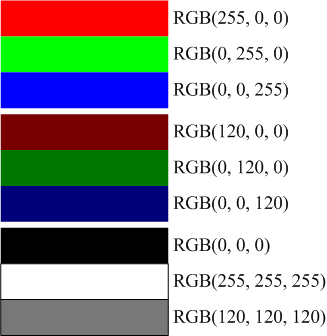
With this little bit of RGB knowledge in hand, it seems that we could simply pick a cut-off value to determine Darkness or Lightness. But unfortunately, it’s not that simple.

Below, I’ve illustrated three shapes, each having the full brightness of red, green or blue. We can see that the red and blue are arguably Not Bright:
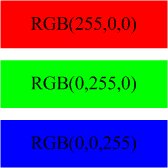
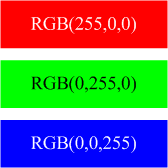
While the green box is certainly Bright, and much-deserving of black text, you could easily make a case for putting white text on the blue shape, and even get away with white text on the red:
Pythagoras Was Here

Thankfully there is a God(s), the Internet, Google, and other people with brains…and difficulties. For example, the W3C has studied this issue, with accessibility for those with visual disabilities in mind.

I recently browsed upon a wonderfully informative article by Nir Dobovizki, over at NBD-Tech. The article: Calculating the Perceived Brightness of a Color, explains in depth the issues behind Brightness and Darkness, the various methods used to calculate it, and other interesting background information.

In the end, Nir proposes his own variant of a brightness formula that I found worked well, and was easily converted to a ShapeSheet formula:

Brightness  =  sqrt( .241 R2 + .691 G2 + .068 B2 )

where R, G and B are the red, green and blue components of a color, respectively.

The formula looks very similar to Pythagoras’ formula for a hypotenuse, but in three dimensions. The coefficients are there because our perception of red, green and blue is not uniform, as I demonstrated before.

The brightness formula returns a result between 0 and 255. If the value is below a certain level, then the color is deemed Dark. Otherwise There Be Light. Nir suggests a value of 130 as a cut-off.

Thanks for all the help, Nir!

Pick Text Color Automatically

After reading Nir’s article, I fired up Visio, drew a rectangle, whipped open the ShapeSheet and added a User-defined cell with this formula:

User.txtColor = IF( SQRT(
                         0.241 * RED(FillForegnd)^2 +
                         0.691 * GREEN(FillForegnd)^2 +
                         0.068 * BLUE(FillForegnd)^2
                         ) < 130, RGB(255,255,255), RGB(0,0,0) )

Note: I added the line-breaks to the formula for readability. You won’t get away with this in the ShapeSheet!

Anyway, this ShapeSheet formula analyzes the value of the FillForegnd cell, which is generally holds the color of a shape. If a shape were to have a fill pattern, then we’d have to deal with FillBkgnd as well. But the pattern will also add to your contrast problems, so let’s not worry about that right now.

Using Visio’s ShapeSheet functions: RED( ), GREEN( ) and BLUE( ), the FillForegnd color is broken into RGB components, analyzed for brightness, and compared to a cut-off value.

The brightness value is wrapped in an IF comparison. You can see the ” < 130″ bit near the end is where the brightness value is compared to a cut-off value.

Based on the IF-result, one of two text colors is returned. If the expression is False, then the color is Dark, and the first color is returned: RGB(255,255,255), which is white.

If the expression evaluates to True, then the color is Light, and the second color is returned: RGB(0,0,0), which is black.

Once our ShapeSheet formula was accurately distinguishing light from dark, we could then link User.txtColor to the cell that determines a shape’s text color: Char.Size, like this:

Char.Size = User.txtColor

and voila, our text-color automatically reacts to our fill-color!

Change Your Perceptio

The cut-off value of 130 is open to interpretation. And since it lives in only one place in our formula, it is easy to change.

In order to see how the cut-off value affected things, I created two versions of the shape: one with a cut-off of 130, the other with a cut-off of 65.

I then created a bunch of matrices with many background color to see how the 65 shapes compared to the 130 shapes. You can see the results below. I flipped one column of shapes so that you can more directly compare them to the other.
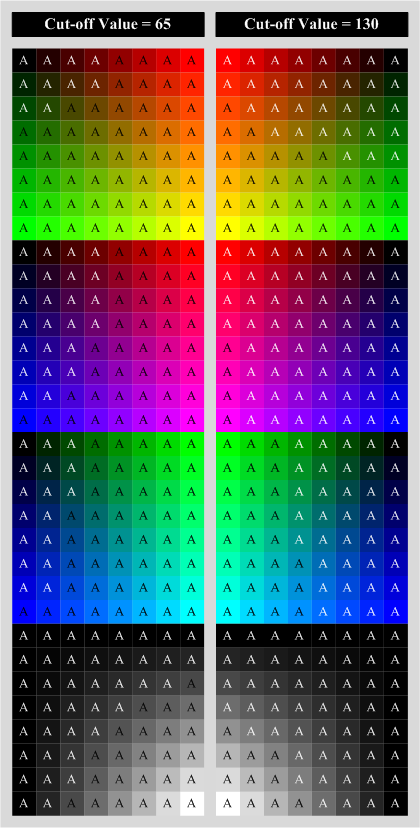
Click to see larger image

I actually like the results for 65 better than for 130. As you would guess, 130 leaves a lot more white text than does 65, since it sees the world as a darker place, so to speak.

I think the final test would be to see how the test patterns print on various printers.

Excercises for the Reader

To make sure you’re all still awake, and not sleeping in class, I thought I’d propose some further tasks that might help reinforce the concepts we’ve discussed today.

Expose the cut-off value in the user-interface

Since the perception of light and dark is somewhat subjective, you might want to expose the cut-off value so that it can be easily changed. See if you can link that “130″ value to a Shape Data (Custom Property) field. Then you can easily change it using the Shape Data window (accessible via the View menu)

Create a test matrix using code

If you think I drew all those squares by hand, and colored each one individually, then as my dear old Dad would say; “You’re NUTS!” I wrote some VBA code to handle this automatically. All I have to do is select one of my smart-text-color Visio shapes, and run the code. The shape gets copied a bazillion times, and gets fitted with a new color, automatically!

Hint: Visio has ShapeSheet functions for decomposing colors into RED( ), GREEN( ) and BLUE( ) values. But you can also compose a color using the RGB( ) function.

A sample bit of VBA code might look like this:

Dim shp as Visio.Shape
Dim f as String
Dim r as Integer, g as Integer, b as Integer
'// Get values for shp, r, g, b from somewhere:
'// ...
'// ...
'// Build the ShapeSheet formula as a template:
f = "RGB( [red], [green], [blue] )"

'// Replace the place-holders in the formula template:
f = Replace( "[red]", r )
f = Replace( "[green]", g )
f = Replace( "[blue]", b )
'// Set the Fill-color formula in the shape:
shp.Cells("FillForegnd").Formula = f

Leave comments (!)

Let us know how you do with the exercises. There are inviting, empty comments fields waiting at the end of this article for your input!

  • What modifications did you come up with?
  • Any cool new variants on the theme, or nifty smart-text-color Visio SmartShapes that you’d like to share?
  • If you get stuck, let us know that too.
  • Which bits would you like to see explained further?
  • What would you like to have available for download?

If you’d like to share your inventions with the Visio community, feel free to send them to us at:

Maybe we can feature them in up-coming articles!

Related Posts

  1. Text to the Bottom of the Shape
  2. Text Resizing with ShapeSheet Formulas
  3. Top Twelve Text Tips
  4. Choose Colors with Shape Data Fields
  5. Run Circles Around Your Text With the Circle-text Title SmartShape

3 Comments »

  • Ted says:

    Another way to go that I have used is to have the text color cell to set text color off of fill color.
    Conceptually….text color RGB = mod((RGB(fill color) – 130),255). This automatically sets text to a light color if fill is dark and vice versa. This does tend to keep the text color in the family of fill color
    (light reddish text for dark reddish fill)

    The”Pythagorean” algorithm could be used to set the text color in a more independent form than fill color
    (shades of white-gray-black regardless of fill color family). May need to play with coefficients since
    gray text on pink is pretty hard to read.

  • Visio Guy says:

    Good stuff, Ted!

    I used to play around with trying to make tints and shades of the fill color, using the HSL( ), HUE( ), SAT( ), LUM( ) functions, but never got it to work right.

    Visio 2007 added some new functions: SHADE and TINT which make things easier, but you still run into the problem of white and black – a shade of white is just white.

    But your Modulus technique is cool. I never thought about how Modulus can be used to “wrap around” ’til I read one of David Parker’s articles: Using Fill Patterns with DataGraphic Color By Value Nice solution to the what text-color to choose for extreme colors like black and white!

  • [...] Visio Guy Make Your Text Stand Out Posted by root 1 hour 54 minutes ago (http://www.visguy.com) Visio guy make your text stand out with a shapesheet formula that chooses a contrasting add your comment below or trackback from your own site av equipment articles a smartshape is worth 1000 symbols powered by wordpress log in entries rss comments rss ar Discuss  |  Bury |  News | Visio Guy Make Your Text Stand Out [...]

Leave a comment!

Add your comment below, or trackback from your own site. You can also subscribe to these comments via RSS.

Be nice. Keep it clean. Stay on topic. No spam.

You can use these tags:
<a href="" title=""> <abbr title=""> <acronym title=""> <b> <blockquote cite=""> <cite> <code> <del datetime=""> <em> <i> <q cite=""> <strike> <strong>

This is a Gravatar-enabled weblog. To get your own globally-recognized-avatar, please register at Gravatar.