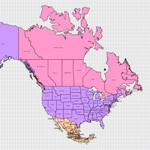
 A few weeks ago, I uploaded the map of Europe Visio diagram. This file provided convenient access to all the shapes of Europe, all neatly arranged relative to one another, living in harmony with peace and unity. Alle Menschen werden Brüder… Today we have the same pain-free (ie: no Shape Search) treatment for North America.
AND, we finally have a short post from the VisioGuy!
To help the folks out in search land, this drawing contains Visio shapes of the following countries:
EN: Alabama, Alaska, Arizona, Arkansas, California, Colorado, Connecticut, District of Columbia, Delaware, Florida, Georgia, Hawaii, Idaho, Illinois, Indiana, Iowa, Kansas, Kentucky, Louisiana, Montana, Maine, Massachusetts, Maryland, Michigan, Minnesota, Missouri, Mississippi, Nebraska, Nevada, New Hampshire, New Jersey, New Mexico, New York, North Carolina, North Dakota, Ohio, Oklahoma, Oregon, Pennsylvania, Rhode Island, South Carolina, South Dakota, Tennessee, Texas, Utah, Vermont, Virginia, Wisconsin, Wyoming, Washington, West Virginia, Alberta, British Columbia, Manitoba, New Brunswick, Newfoundland and Labrador, Northwest Territories, Nova Scotia, Ontario, Prince Edward Island, Quebec, Saskatchewan, Yukon Territory, Aguascalientes, Baja California Norte, Baja California Sur, Campeche, Chiapas, Chihuahua, Coahuila De Zaragoza, Colima, Distrito Federal, Durango, Guanajuato, Guerrero, Hidalgo, Jalisco, Mexico, Michoacan de Ocampo, Morelos, Nayarit, Nuevo Leon, Oaxaca, Puebla, Queretaro de Arteaga, Quintana Roo, San Luis Potosi, Sinaloa, Sonora, Tabasco, Tamaulipas, Tlaxcala, Veracruz-Llave, Yucatan, Zacatecas
DE: Kalifornien, Columbia (Distrikt), Neufundland und Labrador, Nordwest-Territorium, Yucon-Territorium, Baja California (Nord), Baja California (Süd), Mexiko
Download “Visio Map of North America”
s!Aj0wJuswNyXlhXMaEX2i-ULUb6em – Downloaded 20140 times – 103.00 B
How would one go about laying out a grid on this map which identifies Long and Lat? I’d like to be able to geocode addresses of network resources and then place them on the world map based on their long and lat. Easy enough to do in Google maps but I need to generate this information in visio so I can easily overlay different types of resource maps. Any ideas?
Hi Ben,
Visio supports automation, so you can programmatically “do stuff”, say, using the built-in VBA for starters, or a .NET programming language.
That said, we’re not sure if the map shapes contain any kind of latitude or longitude information. There *is* some sort of info stored in the shapes, but we’re not sure what it is.
I imagine one could pick a few known points (like Seattle, Miami, Anchorage, etc.) and do some sort of calibration coding that would allow an approximate placement of geo-coded shapes. Knowledge of what type of projection the shapes are might help too. I think you can find formulas on the web for coverting lat/long info into x-y coordinates for particular map projections.
It was my understanding that in 2007 you could plot things like address or store locations on a map of a state like Mississippi as long as the address were in access or excel. Is that true, if so how?
Thanks
Hi Chris,
I’m not sure how much geo-coding the Visio 2007 map shapes have. They do have some info that allows them to be positioned relative to each other, but I think that’s just graphical info, not real geo-coding.
There is a hidden field called “User.MapData” inside of each map shape, but I’m not sure exactly what it is for.
So the answer is not “No”, it’s “I’m not sure”.
Visio 2007 has a lot of cool data-related features, and it may be that with just a little coding or some clever setting-up, you can get what you are looking for. Maybe someone else will chime in with a comment…
Here are two slightly-related articles that might be of interest to you:
Getting geography data from Visio
Flags of the World
Hi again, Chris,
One thing that you could do with Visio 2007 Professional is link Data Graphics (data-related annotations/adornments to shapes) to state-shapes from Excel data. But the key to the data would be fairly simple, such as State = “Mississippi”
It wouldn’t be a fancy-schmancy geo-coded, address-lookup relationship.
So for example, you could have a U.S. Map or a region thereof, and show sales performance based on color–from your Excel data. Hot states could be red, under-performing states could be blue, etc, depending on how you defined the Data Graphic.
– Chris
I did show how to use MapPoint and Visio to create a Bubble Chart in my blog: here.
Hi Chris,
On your map of Canada you do not correctly depict the Northwest Territories and Nunavut.
Gordon
Hi Gordon,
1. “I” didn’t depict anything. I modified shapes that ship with Visio.
2. How ’bout some references or input as to what is wrong or missing or upside down?
Cheers,
Chris
http://www.trailcanada.com/images/map-canada.jpg
This is a simple map to show the Territory of Nunavut. I hope you can make the change to the map, as I am not that smart. If you do make the changes, would you kindly e-mail me the visio map/shapes, please?
Hi Maggie,
The maps are taken from older versions of Visio and spruced up by me. I don’t worry about border disputes, because the maps are for illustrative purposes, and it’s a slippery slope to go down when one starts worrying about every nook and cranny on the globe, and who owns what.
You might want to learn about Visio’s Fragment operation. You can learn more in this article: Visio Snowflake Generator
Also: Smart Chamfer – A Corner That Doesn’t Stretch has information about fragmenting Visioi shapes.
com health plan upmc health for plan upmc
Is there a way to have visio do a union on all the states in the US? When I do it, I get an error saying “resulting shape is too complex”
Hi Joe,
This is something I’ve been wanting to work on for awhile. The map shapes that come with Visio are too complicated, and I would like to provide some rougher-maps one of these days. There are definitely lots of applications of high-level, lower-res maps!
In the meantime, you can do the following:
1. Get the good ol’ USA from this template: Map of World
2. Slowly union bits and pieces of the US together. Draw a big rectangle over the middle states, but don’t cross any Canada/Pacific/Mexico/Atlantic borders, then union a few states at a time to that rectangle…and the resulting blob.
Doing “everything at once” will give you the error, but as you union, you can actually decrease complexity in some circumstances.
I’ve recently started a blog, the information you provide on this site has helped me tremendously. Thank you for all of your time & work.
Hi – any way you might be able to add Nunavut to the Canada portion of the map?
It is an actual territory, just like Yukon and Northwest, so not having it is like not having any other province/state.
Hi Sramv,
I’ve simply massaged existing map shapes to make them more functional. You could probably draw some lines and use Visio’s Fragment function to separate Nunavut from NWT.
With maps, there’s always somebody who’s been left out, but I assure you it’s nothing personal!
My guess is that a lot of Visio map-shape usage is to illustrate broad concepts, like “Q1 Sales in Alberta”, where the color of the province is interesting,but every last detail of the border is not.
While an average dive is around 40 feet, open-water dives can be
as deep as 85 feet. This holy place is located on the bank of the river Pazhayar.
To his surprise and dismay, he found that her beauty was only matched by her intelligence and grace.