 For quite some time now, I’ve wanted to create a Visio SmartShape of a proper, oval, comic-style Word Balloon shape.
But calculating the intersection of a triangular callout with the perimeter of an ellipse was too foreboding…
…UNTIL NOW!
Zap! Pow! Biff!
The kick-in-the-pants came from David Salaguinto, who writes about Visio for Office Online, and has a very interesting comic/blog called Office OFFline. Office OFFline features software-themed comics, created entirely with Visio!
David wrote this very cool article: Office Hours: Drawing a daily comic strip with Visio, in which he talks about creating comics, using Visio to do it, having fun, and putting your emotions into a storyline.
He also shows us how to manually create a word balloon in Visio by:
- Manually drawing an ellipse
- Manually drawing a triangle
- Manually Union-ing them together
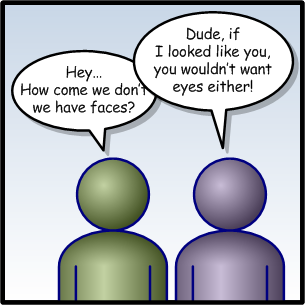
But that’s where I said; “Enough is enough! The world needs a new SmartShape!” I mean, who needs three manual steps, when you can just drag and drop? Visio SmartShape functionality provides the perfect capability for creating a word balloon, where you can simply drag the tail around to whichever character needs to speak – something like this:
Golly Gee, Mr. Kent, Doesn’t Visio Already Have Word Balloons?
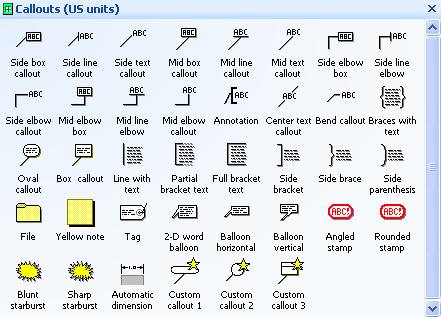
Well, yes Jimmy, Visio does come with some word balloon shapes. They You’ll find them buried are located under: File > Shapes > Visio Extras > Callouts. But the shapes are either rectangular, or oval with a straight callout line.No soft-and-fuzzy comic-style word balloons here, folks. Move along!
Granted, it is difficult to calculate the geometry for an ellipse, so I’ll give the Shape Team a break (actually, I made these, a million years ago…) And the Callouts stencil does indeed has some great shapes (actually, I made these!). Have a look:
But if you want that genuine comic effect, you need an oval balloon, with a triangular tail, and you need to be able to move that tail in any direction.
Who Knows What Evil Lurks in the Hearts of SmartShapes
So over the last few weeks, I’ve been fiddling with the oval word balloon, and ways to calculate the opening where the callout meets the ellipse.
After some truly horrifying iterations, filled with temporary Geometry sections, tens of User-defined cells, and extremely long ShapeSheet formulas,I finally came up with a “brilliant insight”, and was off to the races.
The end result is what this article’s download offers: an easy to use, bona fide Word Balloon shape!
Here, I’ve tried to create a Salaguinto-style, Visio-marketing comic to show off the shape’s capabilities:

click to view larger image
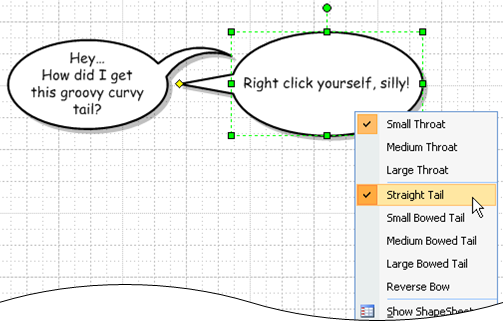
In the example above, the tail is always straight, which can get a bit boring. So to break the repetition, you can right-click the word balloon and change its look. You can change the size of the throat (where the callout meets the ellipse.) You can add some curl to the callout, and you can reverse the arc on that curve:
The download also contains an improved version of the Person shape, which first debuted in: Free Visio People Shapes. The new Person behaves better with Visio 2007’s Theme-ing feature.
Silly Rabbit, It’s Not Just Cartoons!
Just because the shape is a comic-style word balloon doesn’t mean it is only intended for fun and games. While David’s comic/blog is humorous, there are also messages behind the strips that could be used by the marketing department.
And in an article on Boxes and Arrows, Rebeka Sedaca talks about how her team uses comics in presentations to simplify complicated details, yet still get important messages across. Check out: Comics: Not just for laughs!. The article even has a Visio stencil for download that includes generic, office-related comic scenes to which you can add your own word balloons.
Download the Word Balloon…Faster Than a Speeding Bullet!
Get the Word Balloon shape here:
Ban Comic Sans…?
You may have noticed that this article has a slightly-humorous undertone. And the sharp-eyed amongst you might have noticed that the word balloon shape uses the Comic Sans font, to “make it look like I wrote the text by hand.”
As I was searching for comic-related stuff for this article, I stumbled upon move afoot to rid the Earth of this font. I find it rather humorous. If your boss is on vacation, or your in-box is empty, have a look at these links:

Great looking shape, can I put this in one of my own stencils?
I have Visio application to design/document/deploy Messaging Infrastructures based on IBM WebSphere MQ and it’s called MQArchitect.
Hi Michael,
Yes, you can put the Word Balloon in your stencil. But could you first download the latest version? I put some hyperlinks to this article and the home page of Visio Guy in the right-click menu.
Cheers,
– Chris
Hi Chris,
Great! But sometimes things are better left unsaid, even in comics. So how about a Word Ballon Shape 2.0 with additional ‘thinking bubbles’ just to make it perfect?
Cheers,
Andreas
Good idea, Andreas!
I’ve only got so many hours in the day for freebies, but this article/download will get you close:
Bubble Revision Shapes
Maybe you’ll create a Thought Balloon and submit it?
Ciao,
Chris
Thanks for the new shape.
The Comic Sans links were interesting since I tend to use that as my default font.
Hi Visio Guy, thanks for the baloons! I needed them for some diagrams which I am building for a report and I was glad to find them. I have put your name and link to this page in the references of my report. Take care
Your welcome, mma!
Glad you could use the shapes!
– Chris
GREAT — thanks Visio Guy!
I use your bubble for patent drawings!
Thanks again,
David.P
Hi DP!
Thanks for chiming in and letting us know what you do with these shapes. Patent drawings, cool!
Hi
Great smart shape!! I know its all about Visio here but is it possible to use this call out in word -sort of add to its auto shape stencil?
its become an authentic comic software!!
Thanks
Adi.B
Hi Adi,
You can certainly copy from Visio and paste into Word, but you won’t have that “liveness” that an autoshape has.
If you paste to Word, then set layout to “Tight” or “In front of text”, it works pretty well.
Plus, you can double-click the Word Balloon to edit “in-place”. This opens the Word Balloon in a mini, in-place Visio window, where you can change the text, move the balloon’s tail, etc.
Hi Chris. I’d like to use these shapes as background art in a small jokebook app for Windows Phone 7. It’s a fully free app (no ads). The app is really just a way for me to try out Windows Phone development and try a Marketplace submission. Is this shape use OK with you?
Cheers,
Ross
> I’d like to use these shapes .. in a small jokebook app for Windows Phone
I’ll add you to the credits on the About page of the app of course.
Cheers,
Ross