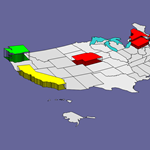
 So we’ve had this experimental Visio drawing containing crude attempts at 3D states laying around since 1993. But we only had three states: Washington, Oregon and California. Well after a few years, a few new Visio features, and some wisdom gained, we’ve finally gotten off our butts and written a little code that helped us produce something a little more useful: an entire map of the USA, where each shape can be extruded into the vertical!
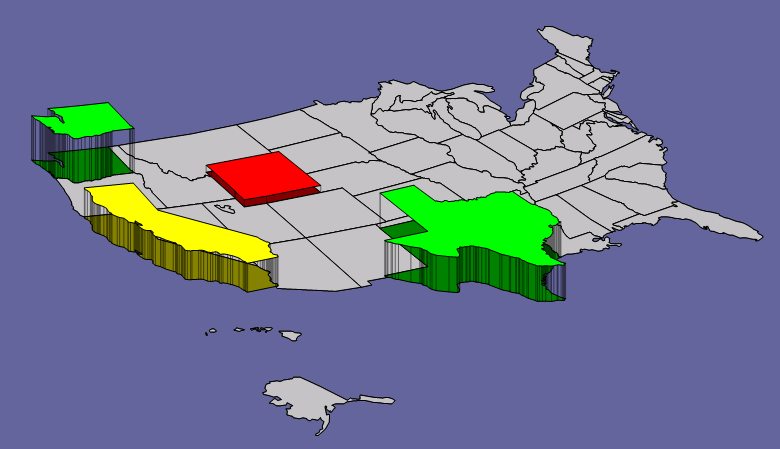
Below, we can see an example of how the US State shapes can be brought into the 3rd dimension. You simply select a state, then pull on the little yellow Control Handle that appears in the middle of the shape. The extrusion is just a bunch of lines that map to the vertices of the shape. For many of the states, we think its an effective look, although someday we’d like to create a solid extrusion.
click to view larger image
By the way, if you’re wondering how we got just the “isometric” shapes in the first place, you might want to have a gander at a previous article from Visio Guy about Skewing Around with Visio & SVG.
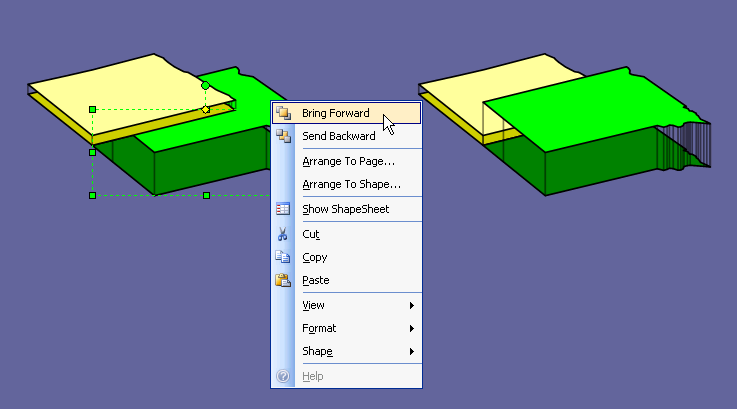
Sometimes a shape might occlude another shape. In that case, you can right-click the shape and bring it forward, or send it back, using the Bring Forward and Send Backward features. Note, these functions only move the shape up or down by one step, so you might have to right-click the menu a number of times before the shape gets to the correct position:
click to view larger image
Note also that the shapes have the Arrange to Page… and Arrange to Shape feature that other Visio map shapes contain. This allows you to easily reposition shapes next to each other in case you have moved them around or resized them.
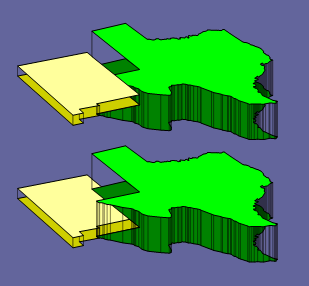
There are some circumstances where nothing can be done regarding Z-order. Below, you can see how Texas wraps around New Mexico in a way that Bring Forward or Send Backward can’t rectify. The way to begin to correct this would be to ungroup the shape and send the individual parts forward or backward. But you’ll find that the extrusion lines are all one shape, and need to be separated, which is not easy . Let’s just say this is a known problem, and is something that we’d like to fix in the future…
We hope you find this little offering fun and useful, and we’d love to hear your comments about it!
Download “3D Extruded Viso Map of USA”
s!Aj0wJuswNyXlhQRJIxPBGMNSjM-K – Downloaded 5072 times – 103.00 BIf you like these shapes and you’ve got a few more minutes to spare, you have to check out this graphic from the New York Times on “The Impact of the Subprime Mortgage Squeeze Across the U.S.”


This is fantastic! Would like to see something similar for the whole world! Thanks.
Great work – any idea on how you could rotate the entire shape (US), keeping the states intact
but rotated too, as to gain various perspective views, keeping the polygons’ (states) original shapes?
Nice! Really nice. I appreciate the effort you put into this.
Hello
Great work on this map, I was wondering if you have done this for a mexico map before? Also if I wanted to go about doing that how would I start? Any help would be appreciated
Thank you
Hi Moutaz, there’s really no easy way to do this, and I haven’t made a map of Mexico. It involved a lot of automation and tricks.
Thank you for your reply keep up the good work
Visio Guy,
I love this, it’s great ! I also agree with David that if we could rotate either the entire map or rotate each state individually, that would be something that would really rock !
So is there a way to automate this so when a user scrolls over a state it automatically extrudes and then even click the state when it is extruded to go to a new page of the state (hyperlink)?
Hi Joshua!
Visio isn’t really Silverlight or Flash, and wasn’t created with animation in mind.
That being said, Visio does have a nice automation model that lets you do lots of things. There are even MouseOver, MouseMove events, but they aren’t as easy to use as similar items in Windows forms are.
In our forum, people have been experimenting with Visio animation: you might want to have a look at Visio Animation Template.
A more typical Visio-like behavior would be to implement some logic (in the ShapeSheet of each state) that allowed a user to double-click or right-click and choose an option that toggled the shape between flat and extruded.
Since Visio diagrams are very likely to be printed or copied to PowerPoint, I think it is logical that static graphics are the priority, rather than animated “Flash-like” effects. But I think animation and live interaction are coming on strong, and will soon be expected to some degree in just about every application. The trick is to allow users to print something that makes sense, and a lot of live, flashy flash-content fails in this respect.
You can also add a mouse-over, pop-up comments to shapes, via: Insert > Edit Shape Screen Tip. This gives diagrams a bit more live interaction.
This is a fabulous map! Anyone know where I could find one like this that breaks the states down into counties?
Hi Thomaseena,
I’d need a normal map first, to which I could apply the 3D treatment. I think the map sources are opening up more and more, so there’s decent free stuff out there, but I haven’t had time to look into it.
Can this be conditionally formatted for color and “height” of each state?
It was good! I like it.