 Microsoft Visio is a great tool for planning your banking scandals!
Ok, the folks in Redmond might not want to market it that way, but it makes a great opening line. Anyway, I saw an interesting-looking flowchart in the Süddeutsche Zeitung, and thought I’d play around with Visio 2010 and see if I could re-create it.
The article Brisanter Deal – Codename ”St. Pancras” described how banks in Hamburg and Munich devised a scheme to get rid of unsightly debt on their records. While that sounds very important and grown-up, I mostly just liked the colors and the look of the flowchart.
That and, after the financial crisis blasted the US, I had to put up with smug, holier-than-thou comments from the Germans (I live in Munich) about how “Ze foolisch Americans borrow zo mahtsch maney.” Understandable in a (technologically advanced!) country where half the stores don’t take credit cards, I suppose. Nevertheless, this article is also a bit about schadenfreude!
AND, that big, red X in the middle is pretty cool! Check it out:
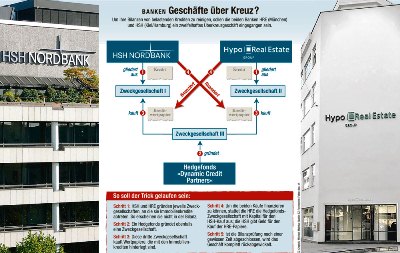
In my continuing mission to push Visio into the realm of respectable graphics, I thought I’d give Visio 2010 a whirl and recreate dieses Flussdiagram.
You see, I rarely actually use Visio. I’m too busy developing custom shapes and solution-code. So today I put on my end-user hat and created this diagram using Visio 2010, and no special features. No ShapeSheet, no VBA code,
It was hard, but I perservered. *sniff*
I didn’t use any shapes from the flowchart stencils, but simply drew rectangles and connected them using the connector tool. Using buttons on the (new!) ribbon tabs, I chose text, line and fill formatting, just as an end-user might do.
Here’s the result, in Visio:

Wait, now that I think of it, I cheated one little bit. Those little, coffee-colored Kredit shapes were created using the fragment function.
Fragment is a bit of an advanced feature, but still, it is a button on the Ribbon (well, on the Developer tab…) I guess you could create the shape by simply drawing jagged lines with the line tool.
Anyway….
You can download and experiment with the file here. Note that it is in Visio 2010 format, but doesn’t use any special features, so it should work with Visio 2007 and Visio 2003.
Download “Kreuz-banken Flowchart (Visio 2010)”
s!Aj0wJuswNyXlhn8SHPorpxPBUmis – Downloaded 3147 times – 103.00 B

Hi Visio Guy,
How did you manage to put the small red circles (1, 2, …) over the connectors?
I downloaded your file and tried to play with it, the circles after a while will push the connectors to re-route which makes the chart not that meaningful!
Thanks
Yasser
Hi Yasser,
It’s just a drawing, the circles aren’t intelligently attached or anything. I probably just used the arrow keys to nudge them over the connectors until they looked right.
Chris