 Do you need people shapes to spruce up those Org-charts, workflow diagrams, or marketing slides? Are you tired of Visio’s outdated or distracting-and-overly-3D shapes? Then you’ve come to the right place!
Today Visio Guy offers its own version of the The Human Form. A subtly shaded, Fisher-Price-looking, person-pawn for your downloading pleasure. And of course, they have a few extra smart features just to sweeten the deal…
Good People are Hard to Find
 At first, I thought I might produce a matrix of all people-related-shapes by stencil. Then I thought that I ought to publish this article sometime this decade. So I resorted to Visio’s Shape Search utility.
I entered a variety of people-related terms in my quest for people-shapes. Below is a sampling of the shapes that I found with each term. The search terms return overlapping shape sets, so I’ll just show the unique shapes for simplicity’s sake.
I found it interesting that I couldn’t enter multiple search terms in the Shapes window. Although I tried various combinations of list separators: spaces, colons, semi-colons, I was only able to get results using single words, or rarely, with two words, separated by a space.
These are the results for the U.S. English version of Visio 2003 Professional:
A search for User resulted in these shapes:

Entering Person found a few more:

Curiously, the extremely cool shape below came from searching for: Human, but the master was named Person! Why in the heck didn’t this one show up when I searched for Person before!?!?

I squeezed out two more Master Shapes using the terms: Man or Men or Woman or Women. I’ll by-pass the golden opportunity for toilet-humor here:

What I Didn’t Like
Okay, there’s plenty of people shapes out there already. So what’s my problem you ask? Well, I’ve a few nitpicks. They’re not exactly global warming, but we get a nicely-formatted bullet list that adds text and makes this look like a serious post:
- Some of them are rather Windows-95-looking, in my opinion.
- Some of the newer 3-D looking shapes are bitmaps, so you can’t really mess with the formatting.
- Too much 3D.
I sometimes find 3D distracting in a diagrams. Icons or symbols are supposed to be simplified to enhance clarity. Do you want a photo of some dude on the men’s room? In my opinion, if you use good-looking, front-on shapes, a diagram can still look cool, but retain an elegant simplicity that makes it clearer. - There are some suprises when formatting the shapes.
If you select any of the Visio-shapes and apply a red fill, you’ll see that the results are often less than spectacular. I must point out that the newer 3D shapes handle the color changes with, er…flying colors.
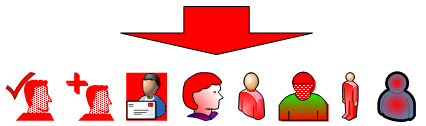
If you apply shadows to the same shapes, they get even dodgier, with the exception of the newer 3D shapes:
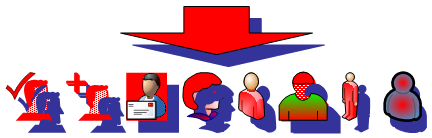
Interestingly, it looks like there’s perhaps a time-line of improvements. We can see that Whale Boy (the last shape on the right) handles shadows just fine, but doesn’t do so well with fill. Two of the other 3D shapes take fill and shadow just fine.
By the way, does anyone know the story of Whale Boy? I’ve heard on more than one occasion that the internal Microsoft name for the MSN Messenger pawn-person was Whale Boy, but I’ve never heard the story behind the name.

Whale Boy
Visio Guys
Enter the Visio Guy Person shape…TADA! You’ll see that it handles color- and shadow-formatting with aplumb:
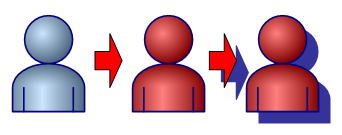
I’ve also created some hat-master shapes that snap and glue onto the person shapes and transform your Visio Guy people shapes into Village People shapes:
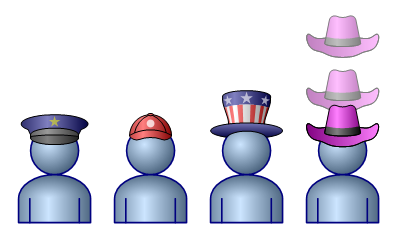
I hope you find the Visio Guy People Shapes useful and entertaining to use!
Download “Free Visio People Shapes (Visio 2007 format)”
s!Aj0wJuswNyXlhn0vx5Xqy-XX-eEV – Downloaded 28626 times – 103.00 BDownload “Free Visio People Shapes (Visio 2002 format)”
s!Aj0wJuswNyXlhnz2ceBj3lw--1Tm – Downloaded 11072 times – 103.00 B
So will he turn to the left (or right), so he can be orthagonal like the other people in the 2007 workflow stencil?
Also, like the other Workflow shapes, will he support the userdefined cell USER.skincolor?
John… Visio MVP
Hi John,
No User.skincolor, since he’s all one color. Face and clothes are the same. He’s a symbol. And since he faces forward, he’s horizontally symmetric…plus then I’d have to draw a side view of each hat! 🙂
The idea was to share a shape that people might find useful or interesting and that is easy to use.
– Chris
Thanks – just what I was looking for. [thumbs up]
Nice shapes! Just thought I would pass along a tip … you can change Whale Boy’s color (the blue part) by right clicking the shape and selecting “Format” then “Style”. In the Style dialog box, select the bottom drop-down (“Fill Style”) and select “People”. Next right-click Whale Boy again and select “Format” then “Fill”. You can now change Whale Boy’s color, fill pattern and/or transparency. You can also select “Format” and “Line” to change Whale Boy’s outline too.
Thanks Robotom3000!
Good tip – you can just edit the “People” style to change the formatting of Whale Boy. This offers much better control than just trying to change the fill color — which can give weird results.
However, for those that try this, that will change the color for every Whale Boy on the page, because it is a change to the style that is applied to every Whale Boy shape. It’s not a solution for individual formatting.
– Chris
great shapes, I’ve used them a few times.
I like the look of these. — Any chance the template file could be saved as an older version of visio? (Like 2002? 🙂 )
thanks
jk
Hi Jeff,
I just added a 2002 version to get you going.
For others, the ‘2007’ version works with Visio 2003 as well.
– Chris
Great shapes, just what i needed
It appears that Microsoft uses the key words ‘head’ or ‘persons’ for their icons of individuals. The singular keyword ‘person’ doesn’t get many hits in Office applications.
Great shapes! Finally I found some good looking people.
Thanks! I was going crazy because I didn’t know what to name them in a search.
THE WHOLE PERSON….I need the whole person and nothing but. As an Audio-Visual Systems Engineer I am always in need of a person (standing & sitting, front & side views) to show scale for a screen, camera mounting location, angle of view, etc. All I have found are head shots. Can anyone help?
hi all i need help my manager asked me to make mape for our racks deviess
and i need all shape for (apc smart rt 1000)
and (all cisco ) juniper – dlink-modem-sun fir- fiber
some one give the free download plz i will lose my work for that task
I am looking for that ‘cool human’ icon and the whole family of related icons. We used to have it as we have some documents where he is used, where on earth can I find him?
All:
I tried to download the Free Visio People Shapes to no avail. I got a message that a login was required. Is there a place on the webpage to login, at all.
(Visio 2007 format) (137.28 KB) – downloads: 2685
Thank you,
Jerry Yee
Hi Jerry,
Certain content will require (painless, cost-free) membership in order to download, I just haven’t made the re-direct page very friendly yet.
There’s a log-in at the very bottom of most Visio Guy pages, where you can create an account.
Thanks for stopping by!
– Chris
Can any of this run on linux? Specifically ubuntu?
Cheers
A
Hi alextacy,
Visio is a Microsoft product that only runs on Windows machines. I wouldn’t be surprised if Dia (for Linux) has some way of importing Visio-xml diagrams.
Visio files can be saved in an xml file format, extension .vdx, that other applications can then read or filter to some extent.
Thanks for the person, very handy, although I should have looked for it earlier. I ended up hacking together my own for a presentation I did.
Some suggestions for improvement, You could have choice of one or many, with the many being the front man plus two chaps hidden behind him.
You could also move the text bit down, or maybe underneath him so you can name your chap…or maybe some other hats like for an engineer (pointy tie), manager (pointy haired of course)…
Thanks for the tips, TB!
I’ll have to check on the text. Usually I include a yellow control handle that allows you to easily reposition the text. Maybe I forgot.
So you’d like a mini-group of people to represent a department or something? Cool!
Hi Visio Guy,
Thanks for being there. I see most of your shapes for Visio 2007 – unfortunately my big corporate employer is stuck on Visio 2003 for a few more years.
I was happy you had the Free Visio People Shapes in Visio 2002 format.
As I test I downloaded both the 2002 and 2007 versions of these shapes. At first it seemed that both worked fine in Visio 2003, but then Visio 2003 hung (had to kill from Task Manager) when using the 2007 shapes. Also I discovered I could not edit the captions of the 2007 shapes.
Does this what you would expect.
Is there any general advise you can provide to Visio 2003 users wrt your shapes developed for 2007 … are we SOL?
Though I may not be able to use many of your shapes, I still find you posts entertaining and educational.
Thanks Again!
As a test I found that your
Hi Slick,
Most of the shapes I’ve built (so far) on this site were done in Visio 2007 or Visio 2003.
The Visio file format changed between Visio 2002 and Visio 2003 so there are probably incompatibility problems.
Also, some of my smarter shapes use new features introduced in Visio 2007. Visio 2003 can always open Visio 2007 files, but some functionality might not work.
So, for some files I simply can’t provide Visio 2002 versions for technical reasons. For the rest, it is mostly because I don’t have time to do it.
Hi, I’ve downloaded already, but sorry for this newbie question, what do I need to do in order to use it? Where should I put the file?
Hi Nicky,
Just put the file wherever you want. Unzip it or go in and remove the “.vsd” file from the zipped file and place it in your favorite Visio files directory.
Then you can open the file and copy shapes from the document into whatever you’re working on!
Hi Visio Guy
Nice site and this is my first post 🙂 great shapes indeed. May be people know about this tip i am going to share 🙂
To add stensils from People Shape
Select all from stencils and right click and then select Add this to My Shapes –> Add to new Stencil —> save it as People shapes.vss
and you dont need to copy paste above downloaded Free Visio People Shapes 2007.vsd in your drawings just rely only on My Shapes >People Shape.vss
Enjoy 🙂
Some suggestions for improvement, You could have choice of one or many, with the many being the front man plus two chaps hidden behind him.You could also move the text bit down, or maybe underneath him so you can name your chap…or maybe some other hats like for an engineer pointy ti, manager pointy haired of course.
Imran14826
http://www.livetv.pk
Thanks for the great ideas, Imran14826!
Hi Visio Guy
I’m hoping you can assist me..I’m looking for some light training materials to train staff how to user Visio Viewer….how I can get some good examples of making process maps become meaningful and alive to our staff….
Thanks.
Wendy
Thanks for this. I’ve been looking for some people shapes with hats. they are just what I need. Good advice. S
When I try to open the zip, I get this error:
Error: central directory not found.
It’s telling me: The compressed (zipped) folder is invalid or corrupted
I really want to use these but I’m using Visio 2012 and don’t know how to get the .vsd file into Visio. Help??
Thanks!
Hi DGW,
I think you mean Visio 2013? There is no Visio 2012. Anyway, it doesn’t matter, you can download the file, unzip it, then open it in Visio 2013, then copy the shapes to any drawing you’d like.
The files are compatible with the newest version of Visio!
Visio 2013 does have a “lock against old files” setting that you might have to change, though.
1. File > Options > Trust Center > Trust Center Settings
2. File Block Settings
3. Uncheck Open and Save for “Visio 2003-2010 Binary Drawings, Templates and Stencils”
Cool
iconsshapes. Just what I was looking for! Thanks!Hopefully neither Visio Guy nor anyone else here will take offense, but I have found some additional great people shapes here: http://www.visiocafe.com/vsdfx.htm. There is more than just people there, but if you’re only looking for the people, you’ll need to download VSDfx-Generic-3D.zip.