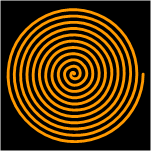
 Ever need a spiral shape? I just found one buried on my hard-drive — something I whipped up years ago, and modified last year. You can download it here.
The download consists of one Visio drawing file (.vsd). This file contains VBA (Visual Basic for Applications) macro-code that generates the spirals. You’ll need to allow this code to run in order to create spirals.
The macro-security setting is located under Tools > Macros > Security… If your security setting is Very High, then the macros will be disabled automatically. If it’s set to High, then you’ll get a warning that the macros have been disabled. A setting of Medium allows you to allow or disallow the macros when you open the document. This is the setting that I always use.
See: VBA Macro Security for more information on Visio, VBA and code inside of documents.
After you open the file, you’ll see a bunch of funny looking arrow shapes. You can select one of these arrow shapes, and type any kind of valid Visio ShapeSheet expression. Since this is the number of spirals that will be generated, you usually just need to enter a number. But if you’re familiar with Visio’s ShapeSheet, you can enter an expression like: 4 + Sin(35deg) – 8^2. Weird, eh?
Check out: Evaluate Shape Text With EvalText for more information on how evaluation of text works.
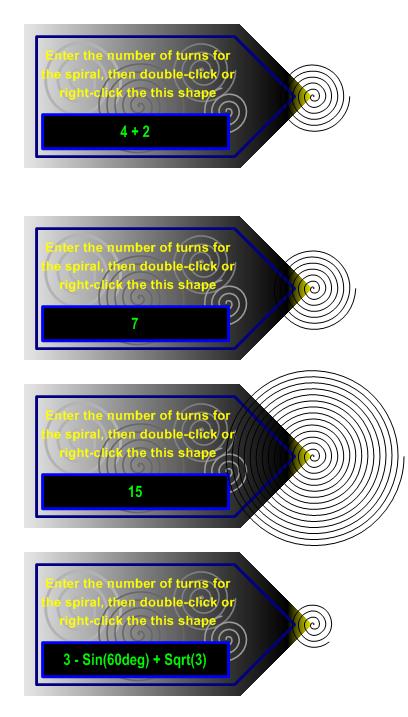
Once you’ve entered the expression, exit text-edit mode by clicking a blank area on the page, or by hitting the Esc key. Now right-click the arrow shape and choose the Generate Spirals from the context menu.
Note: that the spiral will be generated at the tip of the arrow, and if there was already a spiral there before, then the new spiral will be drawn over the old one — you might think that nothing happened at all!
Of course, you can check out the code that makes this all happen by opening up the VBA editor. The quickest way to see it is to press Alt + F11. But you can also get there via Tools > Macros > Visual Basic Editor…
Happy spiraling!
Note: the download contains two files, one saved in Visio 2002 format, the other in Visio 2003 format. So users of Visio 2010, 2007, 2003, 2002 and possibly 5 should be able to use this tool!
Download “Visio Spiral Shape Maker (Visio 2002 & 2003)”
s!Aj0wJuswNyXlhlTvDTEQ8mjdhppo – Downloaded 12931 times –
Thanks for this application. I am writing my Master’s dissertation and needed a spiral! It works well – just what I needed.
Kind regards
I am trying to do a spiral model as part of my post graduate studies and have downloaded the above file but inly have visio2002. Is it possible to send a visio2002 version of the shape maker template?
Hey Paul,
Greetings from Hong Kong — a thoroughly wired city. Check the end of the article again, I’ve uploaded “Download Sprial 2002.zip (57 kb)” for you. Hopefully this will work — and tell your fellow grad-students that the Visio Guy delivered from China! 😉
– Chris
Works like charm!
Thanks,
Benno.
You are just gr8!
Thanks so much for this – you’ve saved me at least an hour’s work on my assignment tonight!!
It’s people like you that make the internet such a powerful thing..
Keep it up.
AJ
how to do it clockwise !!
Hi Laura,
Try flipping it horizontally or vertically (Ctrl+H or Ctrl+J)
thanks a lot. it works !!
Note: I Just updated the download to include Visio 2002 and Visio 2003 versions in one nifty package!
The file you point us to for the spiral generator code is no longer present at that location. Can you update that link for us?
Thanks.
Thanks David,
The link’s been removed The download link at the end of the article is still good.
– Chris
Thank you so much…you saved me tons of time, and I have a perfect figure!
🙂 DH
I need a Euler spiral. Any chance your would make one of those?!
Wikipedia: Euler Spiral (Spiros, Clothoids or Cornu Spirals)
Thanks
Stephen
Hi Stephen,
Do you need single or double? Which parameters would you want to enter?
Hello,
i have Visio 2010 and if i try to generate more than 80 turns it gives me a runtime error.
Is there a workaround to solve this problem?
Greets
Thilo
Hi Thilo,
As far as I can tell, it is a limitation of the DrawSpline method.
If you don’t mind digging into the VBA, you can play with two lines in this procedure:
     Public Sub Spiral(shpLaunch As Visio.Shape, dNumRevs As Double)
          ...
          ...
     End Sub
Reduce the number from 50 for this line:
Const PTS_PER_REV% = 50Change this line:
Set shpSpiral = shpLaunch.ContainingPage.DrawSpline(pts, TOLERANCE#, visSplinePeriodic)to this line:
Set shpSpiral = shpLaunch.ContainingPage.DrawSpline(pts, TOLERANCE#, visSplineAbrupt + visSplinePeriodic)I was able to reduce the points to 30 per revolution and get 135 spins. However the result is not as smooth.
I’ve changed as you wrote but with Const PTS_PER_REV% = 10 so i get max. 409 turns.
Then i set the line rounding to 100 inch to smooth the lines an delete the last line point.
Thanks from germany
Thilo
Super tipp!
Nichts zu danken, aus München.
Hello All
how can i type in spiral? I am using a Visio 2010 version. Please advise.
Thank you in advance.
Cesar
Hi Cesar,
Your question isn’t clear. I don’t know what you want to do.
Today I’ve built stand-alone spiral shapes that work without any code. I have versions that do up to 10, 50, 100 or 500 revolutions. I will likely sell them for a nominal fee.
Leave a comment if you’re interested!
Cheers,
Chris
Dear all,
I have Visio 2010 and cannot enter anything into spiral dialogue box, i.e. change number of turns. Seems like that box is not active. I can also change this number in VBA but which parameter to change?
Hi Visio Guy,
I’m using Visioo 2007 and your 2003 spiral generator works just great. I need to draw a hollow spiral. Imagine you drew a spiral of 15 revolutions, then delete the inner 11. is this possible please?
Thanks
Andy.
I gather that if I edit the Visual Basic behind the spiral maker, I could change this from an Archimedean to a logarithmic or some other variety of spiral. I don’t see the code when I call up Visual Basic in Visio, though. How would I get there? Thanks.
Hi John,
You should just be able to hit Alt + F11 to fire up the VBA environment.
Then View > Project Explorer if the modules panel isn’t showing on the left.
Inside the SpriralCode module, you’ll find the sub Spiral, which is called directly from the “calculator” shape using the CALLTHIS ShapeSheet function.
The code fits a NURBS curve to the set of points you generate. I think there’s a discussion in the comments above about the limitations of “too many points”.
The code that I delivered is doing 50 points per revolution, and the “slope” of the spiral is 0.01, so any radius is r(theta) = 0.01 * theta. Pretty simple stuff.
There’s a weird If-Else inside the loop that I’m not sure about, but it appears to only affect the very last point at i = iNumPts – 1.
I suppose I should have allowed a property for changing the “slope” of the spiral within Visio. I think I was thinking that stretching the shape accomplished the same thing, but now that I look at it with older, wiser eyes, I see that isn’t true!
Hi Visio Guy,
I tried downloading the file but the link is dead. By any chance you have other links to download? Also, will this work with Visio 2016? Thanks!
Hi Jjrlb,
It looks like a bunch of the download links got munged. I’ve fixed this one!